

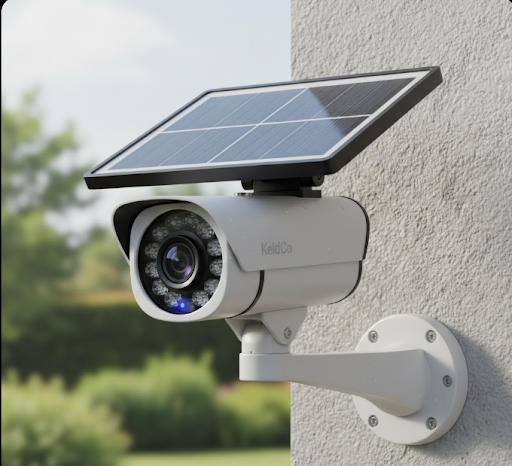
The best 3g solar security camera market has largely transitioned to 4G LTE technology, offering faster speeds, better reliability, and future-proof connectivity. If you're shopping for a solar-powered security camera with cellular connectivity, you'll find that 4G options like the KeldCo Solar Camera Pro 2.0 4G deliver superior performance with wider network coverage and faster data transmission than older 3G models.
While 3G networks served their purpose well, most carriers have shut down or are phasing out 3G service entirely. This means investing in a 3G camera today could leave you with a non-functional device within months. Understanding why 4G solar cameras represent the current standard helps you make a smart investment that protects your property for years to come.
Why Solar Security Cameras Moved From 3G to 4G Technology
The transition from 3G to 4G cellular networks happened across the security camera industry for several important reasons. First, major cellular carriers including AT&T, T-Mobile, and Verizon have either completely shut down their 3G networks or announced firm shutdown dates. AT&T closed its 3G network in February 2022, while T-Mobile completed its shutdown in July 2022. This means any 3G camera purchased today won't connect to these networks at all.
Beyond network availability, 4G LTE technology offers significant performance improvements over 3G. Data transfer speeds on 4G networks range from 5 to 12 Mbps for uploads, compared to 3G's typical 0.5 to 1.5 Mbps. This faster speed matters tremendously when your camera needs to upload high-definition video clips or send real-time alerts to your phone. A 30-second video clip that takes 45 seconds to upload on 3G might transfer in just 8 seconds on 4G.

The improved latency of 4G networks also makes a noticeable difference in security applications. When motion triggers your camera, 4G networks deliver push notifications to your phone in 1 to 2 seconds, while 3G could take 5 to 8 seconds. Those extra seconds can mean the difference between catching a package thief in action or only seeing them walk away.
What Makes a Solar Security Camera Work on Cellular Networks
Solar security cameras with cellular connectivity combine three key technologies that work together seamlessly. The solar panel on top of the camera converts sunlight into electricity, which charges an internal battery. This battery powers both the camera's recording functions and its cellular radio, eliminating the need for any wired power connection.
The cellular radio inside the camera connects to nearby cell towers just like your smartphone does. When the camera detects motion or you want to view live footage, it uses this cellular connection to transmit data. Unlike WiFi cameras that need your home internet, cellular cameras work anywhere that has cell service, making them perfect for remote properties, RV security setups, construction sites, or vacation homes.
The camera's processor manages power consumption carefully to ensure the solar panel can keep the battery charged. Modern cameras like the KeldCo Solar Camera Pro 2.0 4G use intelligent sleep modes that minimize power draw when no activity is detected. The camera wakes up instantly when motion occurs, records the event, and sends you an alert, all while maintaining enough battery reserve for cloudy days.
Comparing 4G Solar Cameras to Other Security Options
When you're evaluating security camera options, understanding how 4G solar cameras stack up against alternatives helps you choose the right solution. Traditional wired cameras require both electrical wiring and often internet cable connections, which means installation costs can run several hundred dollars per camera location. Running wires through walls or underground to reach remote areas of your property adds even more expense and complexity.
WiFi security cameras avoid the wiring hassle but create a different limitation. They need to stay within range of your home's wireless router, typically limiting placement to within 100 to 150 feet of your house. If you need coverage for a detached garage, barn, or gate at the end of a long driveway, WiFi cameras simply won't reach. They also depend entirely on your home internet connection, so any outage leaves your cameras offline.
Battery-powered cameras without solar panels require regular recharging, often every 2 to 3 months depending on usage. For cameras mounted high on walls or in hard-to-reach locations, this creates an ongoing maintenance burden. Some homeowners find themselves climbing ladders monthly during high-activity periods, while others simply forget until the camera dies at the worst possible moment.
Here's how these options compare in practical terms:
| Feature | 4G Solar Camera | Wired Camera | WiFi Camera | Battery Only Camera |
|---|---|---|---|---|
| Installation Difficulty | Easy mounting only | Professional wiring needed | Moderate setup | Easy mounting only |
| Range Limitation | Cell coverage area | Wire run distance | WiFi signal range | Unlimited |
| Monthly Costs | SIM data plan | None (after install) | Internet required | None |
| Power Source | Self-charging | Continuous AC power | AC or battery | Manual recharge needed |
| Remote Location Use | Excellent | Difficult/expensive | Poor | Good (short term) |
Key Features to Look for in 4G Solar Security Cameras
Shopping for a quality 4G solar security camera means evaluating several critical specifications that directly impact performance. The solar panel size determines how quickly the battery recharges and whether the camera can maintain charge during winter months with shorter days. Look for panels that measure at least 5 watts, with 6 to 8 watt panels providing better performance in challenging weather conditions.
Battery capacity matters just as much as the solar panel. A quality camera should include a rechargeable battery rated for at least 10,000 mAh to provide several days of reserve power during extended cloudy periods. The Solar Camera Pro 2.0 4G from KeldCo combines an efficient solar panel with a high-capacity battery that keeps recording even during week-long storms.
Video resolution directly affects your ability to identify faces, license plates, and other important details. While 1080p provides decent quality, cameras with 2K or higher resolution deliver noticeably sharper images. Night vision capability is equally important since many security events happen after dark. Infrared LEDs should illuminate at least 30 to 50 feet clearly without washing out the image with too much brightness.
The camera's field of view determines how much area a single camera can monitor. Most quality cameras offer 110 to 130-degree viewing angles, which captures a wide area without the distortion that ultra-wide lenses create. Pan and tilt functions add even more coverage, allowing one camera to monitor areas that might otherwise require two or three fixed cameras.
Two-way audio lets you communicate through the camera, which proves useful for greeting delivery drivers, warning off trespassers, or checking in on family members. The audio quality should be clear enough for normal conversation at distances up to 20 feet. Built-in sirens add an extra deterrent, with 100-decibel alarms loud enough to startle intruders and alert neighbors.
Understanding Data Usage and Monthly Costs
One of the most common questions about 4G solar cameras centers on data consumption and the resulting monthly costs. The amount of data your camera uses depends heavily on how you configure it and how much activity it records. A camera set to record every motion event in high definition will consume significantly more data than one configured for lower resolution or shorter clip lengths.
On average, a 4G security camera recording 20 motion-triggered clips per day at 1080p resolution uses approximately 2 to 4 GB of data monthly. Each 30-second clip at 1080p typically requires 10 to 15 MB, while the same clip at 720p uses only 5 to 8 MB. If your camera location experiences heavy activity, like a busy driveway or store entrance, budget for 5 to 8 GB monthly to ensure you don't run out of data mid-month.
Live viewing adds to data consumption separately from recorded clips. Watching live footage for 10 minutes uses roughly 150 to 200 MB at standard quality. Most users check their cameras sparingly, so live viewing typically adds less than 1 GB to monthly totals. However, if you frequently monitor your camera throughout the day, this could double your data needs.
Monthly data plan costs vary by provider and data allowance. Basic plans with 2 to 5 GB typically cost between $10 and $20 monthly, while unlimited plans run $25 to $40. Many users find that a mid-tier plan with 5 to 10 GB provides plenty of data for typical residential use while keeping costs reasonable. Unlike traditional security systems with professional monitoring fees of $30 to $60 monthly, DIY security systems with cellular cameras give you control over your budget.
Installation and Setup Process for Solar Cameras
Installing a 4G solar camera proves surprisingly straightforward compared to wired security systems. The process typically takes 30 to 45 minutes per camera, even for first-time installers. You'll need just a few basic tools including a drill, screwdriver, level, and pencil for marking mounting holes.
Start by choosing your camera location carefully. The solar panel needs at least 4 to 6 hours of direct sunlight daily to maintain a full charge, so avoid mounting under roof overhangs or in heavily shaded areas. South-facing locations in the Northern Hemisphere receive the most consistent sunlight throughout the year. The camera itself should have a clear view of the area you want to monitor, positioned high enough to prevent tampering but not so high that facial details become unclear.
Before drilling any holes, hold the camera mounting bracket against the wall and check the view using your phone's camera app at approximately the same height and angle. This simple test helps you verify coverage before committing to the installation. Mark your mounting hole locations with a pencil, then drill pilot holes appropriate for your wall type. Brick and stucco require masonry bits and anchors, while wood siding uses wood screws directly.
After securing the mounting bracket, attach the camera and adjust its angle for optimal coverage. Most quality cameras allow both horizontal and vertical angle adjustments. Connect the camera to power, then download the manufacturer's app on your smartphone. The app guides you through connecting the camera to the cellular network by scanning a QR code or entering the camera's serial number.
Insert your activated SIM card according to the manufacturer's instructions. Most cameras require you to remove a small panel or cover to access the SIM slot. Power on the camera and wait for the status light to indicate successful cellular connection, which typically takes 1 to 3 minutes. Test the camera by triggering motion detection and verifying that you receive alerts on your phone.
Why KeldCo Solar Cameras Lead the 4G Market
When comparing 4G solar security cameras, the KeldCo Solar Camera Pro series stands out for several reasons that matter to homeowners and businesses. The build quality exceeds typical consumer cameras, with weather-resistant housing rated for extreme temperatures from negative 4 degrees to 140 degrees Fahrenheit. This durability ensures reliable operation whether you're monitoring a Florida pool area or a Montana ranch entrance.
The Solar Camera Pro 2.0 4G delivers 2K resolution video that captures fine details other cameras miss. This higher resolution proves crucial when you need to read a license plate from 25 feet away or identify a person's facial features clearly. The camera's advanced image sensor performs exceptionally well in low light, producing usable color footage even during dawn and dusk hours when many cameras switch to grainy black-and-white mode.
For locations where you can provide WiFi connectivity, the Solar Camera Pro 3.0 WiFi offers an alternative that eliminates monthly data charges while maintaining the solar-powered convenience. This model works perfectly for monitoring areas within WiFi range like backyard pools, side gates, or detached workshops near your home. You get the same video quality and features as the 4G model but connect through your existing internet instead of cellular networks.
Both models include AI-powered motion detection that distinguishes between people, vehicles, and animals. This smart detection reduces false alerts from swaying trees or passing clouds, so you only receive notifications about events that actually matter. The cameras also support local SD card storage up to 128 GB, providing backup recording even if your cellular connection temporarily drops.
Real-World Applications for 4G Solar Cameras
The versatility of 4G solar cameras makes them ideal for situations where traditional security cameras fall short. Rural property owners use them to monitor remote gates, barns, or equipment storage areas located hundreds of feet from the nearest power outlet. A farmer might position cameras at multiple field entrances to track when farm equipment arrives or leaves, all without running a single wire.
Construction site managers rely on 4G solar cameras to prevent theft and vandalism at job sites that lack electrical infrastructure. The cameras document daily progress, verify contractor schedules, and provide evidence if tools or materials go missing. Since construction sites often operate in areas without nearby WiFi networks, cellular connectivity becomes the only practical option for reliable monitoring.
Vacation home owners appreciate 4G solar cameras for keeping watch over properties they visit only occasionally. The cameras monitor for unexpected visitors, verify that maintenance contractors complete scheduled work, and provide peace of mind when severe weather threatens. Unlike hardwired security cameras that require an active power connection, solar cameras continue working even if you shut off utilities between visits.
Small business owners install 4G solar cameras to monitor parking lots, loading docks, or outdoor storage areas that fall outside their building's WiFi coverage. A restaurant might watch its dumpster area to catch illegal dumping, while a retailer monitors parking lot corners where shoplifters sometimes abandon stolen goods. The cellular connection ensures footage uploads to the cloud immediately, preventing evidence loss if someone damages or steals the camera.
Troubleshooting Common 4G Solar Camera Issues
Even quality cameras occasionally experience issues that simple troubleshooting can resolve. If your camera stops connecting to the cellular network, first verify that your SIM card data plan remains active and hasn't exceeded its monthly limit. Check your account through your carrier's app or website to confirm service status. If the plan is active but the camera still won't connect, remove and reinsert the SIM card to ensure proper contact with the card reader.
Weak cellular signal strength shows up as delayed notifications, failed video uploads, or choppy live streaming. If your camera consistently shows one or two signal bars, try repositioning it to a higher location or different side of the building. Cellular signals often vary significantly across short distances, and moving a camera just 10 feet can sometimes improve signal strength by 40 to 50 percent. An external antenna accessory can also boost signal reception in challenging locations.
Battery drain problems usually trace back to either insufficient solar panel exposure or excessive camera activity. Check that nothing blocks the solar panel, including accumulated dirt, leaves, or snow. Clean the panel monthly with a soft cloth and plain water. Review your motion detection settings to ensure the camera isn't triggering constantly from tree branches or busy street traffic in the background. Adjusting detection zones and sensitivity typically cuts unwanted activations by 70 to 80 percent.
Video quality that appears blurry or washed out often results from a dirty camera lens or improper exposure settings. Wipe the lens gently with a microfiber cloth designed for camera optics. Check your camera's brightness and contrast settings through the app, as some cameras ship with default settings that don't suit all lighting conditions. For nighttime footage, verify that the infrared LEDs activate properly by looking at the camera in darkness; you should see a faint red glow indicating the infrared lights are working.
Maximizing Performance During Different Seasons
Solar camera performance varies with seasonal changes in sunlight availability and weather conditions. Understanding these variations helps you maintain reliable operation year-round. During summer months with long days and strong sunlight, your camera likely stays fully charged with ease. The solar panel may complete charging by mid-morning, leaving plenty of reserve power for nighttime recording and cloudy days.
Winter presents more challenges, especially in northern climates where daylight hours drop to 8 or 9 hours daily. Snow accumulation on the solar panel can completely halt charging until you clear it away. Plan to check and clean your camera's solar panel after significant snowfall. Positioning cameras on south-facing walls helps maximize winter sun exposure, as these locations receive the most direct light during low-angle winter sunshine.
Cold temperatures affect battery performance more than most people realize. Lithium batteries lose roughly 20 percent of their capacity when temperatures drop to freezing, and performance declines further as it gets colder. This doesn't damage the battery permanently; performance returns to normal when temperatures rise. However, it does mean your camera may need more frequent charging during winter, especially if mounted in an unheated location. Quality cameras like those from KeldCo use battery management systems that compensate for cold weather effects automatically.
Spring and fall offer ideal conditions for solar cameras, with moderate temperatures and adequate daylight hours. These seasons provide good opportunities to test new camera locations or adjust positioning, since you'll see representative performance without summer's abundance or winter's challenges. Take advantage of these months to establish baseline expectations for your camera's battery life and charging patterns.
Legal Considerations and Neighbor Relations
Installing security cameras, including solar models with cellular connectivity, comes with legal responsibilities and etiquette considerations that vary by location. Generally, you can legally record video on your own property and in public spaces, but audio recording laws differ significantly between states. Some states allow one-party consent for audio recording, while others require all parties to consent. Most security camera users simply disable audio recording to avoid potential legal complications, though this does eliminate the two-way communication feature.
Camera positioning matters greatly for maintaining good relationships with neighbors and avoiding privacy complaints. Point your cameras at your own property lines, driveways, and entrances rather than directly into neighbors' windows or private yards. Even if technically legal in your area, cameras that obviously monitor your neighbor's backyard create tension and disputes. Adjust your camera angles and detection zones to focus on your property while minimizing overlap into neighboring spaces.
Many neighborhood associations and homeowners' associations have specific rules about security camera placement, appearance, and usage. Review your HOA guidelines before installing cameras to avoid violations that could result in fines or required removal. Some associations restrict camera visibility from the street or limit placement to specific areas. Others may require architectural approval for any exterior modifications, including camera mounts.

Proper signage sometimes helps with both legal compliance and deterrence effectiveness. Signs reading "Video Surveillance in Use" or similar warnings alert visitors and potential intruders to your security measures. While laws about signage requirements vary, being transparent about surveillance generally strengthens your legal position if footage ever becomes evidence in court. The deterrent effect of visible cameras and signs often prevents incidents from occurring in the first place.
| Legal Aspect | What You Need to Know |
|---|---|
| Video Recording | Generally legal on your property and public spaces |
| Audio Recording | Varies by state; many require all-party consent |
| Neighbor Privacy | Avoid pointing cameras at neighbors' private spaces |
| HOA Rules | Check restrictions before installation |
| Signage | Recommended for transparency and deterrence |
Comparing KeldCo Models to Choose the Right Camera
Deciding between the Solar Camera Pro 2.0 4G and 3.0 WiFi depends on your specific location and connectivity preferences. The 4G model makes sense for remote locations without reliable WiFi coverage, such as farm buildings, gates at long driveways, or vacation properties where you may not want to maintain internet service year-round. This model gives you monitoring capability literally anywhere you can mount a camera and get cellular signal, making it the most versatile option for properties with scattered monitoring needs.
The WiFi model works perfectly when you already have strong WiFi coverage in the area you want to monitor and prefer avoiding monthly data charges. Properties with business CCTV needs close to the main building often benefit from WiFi models, since they can leverage existing network infrastructure without adding recurring costs. You get identical video quality and features but save the $10 to $20 monthly data expense.
Both models share core features including 2K resolution, color night vision, two-way audio, and AI-powered motion detection. The solar panels and batteries are identical, providing the same reliable power performance. Setup and installation procedures are nearly the same, with the primary difference being whether you connect to cellular networks or WiFi during initial configuration.
Consider ordering one of each model if you have multiple monitoring needs. Use the 4G version for remote locations like gates or detached buildings, while deploying WiFi models for areas within your network range like backyard entrances or side yards. This hybrid approach maximizes value by avoiding unnecessary data charges where WiFi works well while maintaining coverage in areas where cellular is the only option.
Wrapping Up Your Solar Security Camera Decision
Choosing the best 3g solar security camera in today's market means understanding that 4G technology has become the current standard for reliable, future-proof security monitoring. While 3G networks served their purpose admirably for years, their shutdown across major carriers makes them obsolete for new installations. Cameras like the KeldCo Solar Camera Pro 2.0 4G provide the cellular connectivity you need with modern network speeds and wide compatibility.
The combination of solar power and 4G connectivity solves real-world security challenges that other camera types struggle with. You get the placement flexibility of wireless cameras without the range limitations of WiFi or the maintenance burden of battery-only models. Monthly data costs remain manageable for most users, especially compared to traditional professionally monitored security systems that charge significantly higher fees.
Whether you're protecting a rural property, monitoring a construction site, watching over a vacation home, or enhancing self-monitoring security systems for your business, 4G solar cameras deliver reliable performance without the complexity and expense of wired installations. The technology has matured to the point where these cameras match or exceed wired systems in video quality while offering far more flexibility in placement and installation.
For more information on security camera options and installation guidance, check out these helpful resources on how to install security cameras or explore different types of security cameras to understand all your options. You might also find value in learning about outdoor security cameras without subscriptions to see how solar cameras compare to other monitoring approaches.
Frequently Asked Questions
Who makes the best solar-powered security cameras?
KeldCo makes the best solar-powered security cameras with their Solar Camera Pro series offering 2K resolution, reliable 4G connectivity, and weather-resistant construction. Their cameras feature high-capacity batteries and efficient solar panels that maintain charge even during cloudy periods. The build quality exceeds consumer-grade alternatives with components rated for extreme temperature ranges, while AI-powered motion detection reduces false alerts significantly compared to basic motion sensors.
Are solar-powered security cameras any good?
Yes, solar-powered security cameras are excellent for locations without convenient power access. They provide reliable 24/7 monitoring without wiring hassles or monthly battery maintenance. Modern solar cameras like KeldCo's models match wired cameras in video quality while offering superior installation flexibility. The technology has advanced significantly in recent years, with improved solar panel efficiency and larger battery capacities that maintain operation through extended cloudy periods.
How much data does a 4G solar camera use?
A 4G solar camera typically uses 2 to 4 GB monthly for average residential use. This assumes roughly 20 motion-triggered recordings daily at 1080p resolution. High-activity locations may consume 5 to 8 GB monthly, while minimal-activity areas might use only 1 to 2 GB. Live viewing adds approximately 150 to 200 MB per 10 minutes watched. Most users find mid-tier data plans with 5 to 10 GB provide adequate coverage while keeping costs under $20 monthly.
What are the disadvantages of solar security cameras?
Solar cameras require adequate sunlight exposure and may need positioning compromises. Heavily shaded locations don't receive enough sun to maintain battery charge, limiting mounting options. Winter weather in northern climates can reduce solar efficiency by 30 to 40 percent compared to summer. Initial costs run higher than basic battery cameras, though eliminating monthly monitoring fees balances this over time. 4G models also add recurring data plan expenses that WiFi cameras avoid.
Is it legal for my neighbor to record me with their Ring camera?
Generally yes, neighbors can legally record areas visible from their property including public spaces and property lines. However, they cannot record inside your home through windows or point cameras directly at private areas like your backyard if it's enclosed. Laws vary by state regarding audio recording, with some requiring two-party consent. If you feel a neighbor's camera violates your privacy, document the camera's field of view and consult local ordinances or a property attorney for specific guidance based on your location.


