If your cameras blur at night, miss motion, or randomly disconnect, upkeep is usually the fix. Dust, spider webs, loose connectors, outdated firmware, and full storage all degrade quality. Regular care prevents blind spots, protects SD cards and NVR drives, and preserves crucial evidence when you need it most.
Quick internal picks: Upgrade range and reduce dropouts with our 5G security camera outdoor options, or tighten detection accuracy with security camera motion detection models. 📶🎯
How To Maintain Your Cameras: A Practical Field Checklist
Think of upkeep in three layers: environment, hardware, and software. Move from outside to inside so you do not recontaminate cleaned parts.
Environment
-
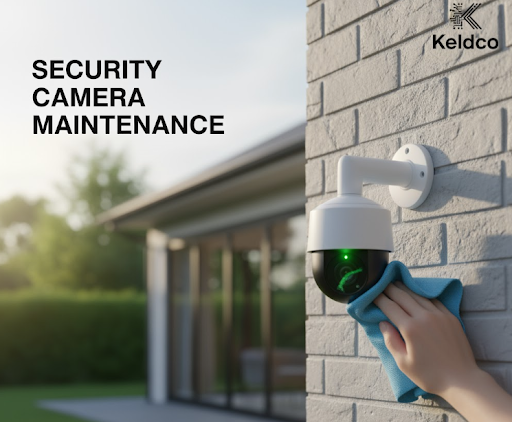
Trim branches and clear nesting points. Wipe housings and sunshields with a damp microfiber cloth. Avoid harsh cleaners that cloud polycarbonate.
-
Remove webs and flying debris. Aim a soft brush upward to avoid pushing dust into seals.
Hardware
-
Power off, then clean lenses with lens-safe fluid on a microfiber square. Do not spray the lens directly.
-
Check gaskets and junction boxes for moisture. Reseat PoE plugs and tighten weatherproof couplers.
-
Inspect mounts and aim. A quarter turn on set screws brings framing back after wind or vibration.
Software and Storage
-
Update camera firmware and NVR apps after backing up settings.
-
Review storage health. Replace aging SD cards every 12 to 18 months in high-write locations. Check NVR SMART data.
-
Recalibrate motion zones and sensitivity after seasonal light changes.
Pro tip: After any clean or reposition, record a 30-second clip at day and night to verify focus, IR performance, and audio if applicable. Then label the clip with date and camera ID for future comparisons.

Suggested Maintenance Schedule By Location 🗓️
| Location Type | Monthly Tasks | Quarterly Tasks | Annual Tasks |
|---|---|---|---|
| Front entry with porch light | Wipe lens, clear webs, test motion notifications | Re-aim for seasonal sun angles, firmware updates | Replace SD card, refresh desiccant packs |
| Driveway or gate, exposed | Clean lens and IR array, check bracket torque | Inspect cable armor and UV wear, re-seal junctions | Recoat metal mounts, replace cracked gaskets |
| Indoor hallway | Dust lens and vents, test motion | Review privacy masks and retention rules | Refresh UPS battery and labels |
| Warehouse or shop | Wipe lens, vacuum vents, review bandwidth | SMART check NVR drives, fan clean | Replace HDDs nearing end-of-life cycle |
Calibrating Motion Detection The Right Way
False alerts usually come from three causes: overly large detection regions, high sensitivity, or busy backgrounds. Start conservative, then expand.
-
Draw tight zones around doors, gate lines, or walkway edges.
-
Set sensitivity mid scale. Run test walks at slow and fast pace.
-
Add a minimum object size to ignore pets or foliage.
-
Adjust night-only sensitivity up one notch to compensate for low contrast.
Want a deeper dive into rules and audio behavior? Read can security cameras record audio to set expectations and avoid compliance issues. For mobile access checks, use how to connect security camera to phone to ensure alerts reach you wherever you are. 📱
Night Vision And Glare: Solving The Common Image Killers
IR Bleed: A greasy dome or a nearby wall can reflect IR back into the lens, creating white fog. Clean the dome, then slightly tilt the camera so IR does not bounce straight back.
Window Reflections: If you must shoot through glass, disable IR and add an external illuminator placed off-axis to prevent feedback.
Headlight Smear: Enable WDR and lower exposure time. If your model supports HLC, turn it on to tame bright plates at night.
Which option works best? For outdoor driveways with frequent movement, a purpose-built model that pairs long-range IR with smart motion performs best. Browse 5G security camera outdoor to stabilize streams and reduce latency during remote live views.
Symptom → Likely Cause → Fast Fix ✅
| Symptom | Likely Cause | Fast Fix |
|---|---|---|
| Random offline alerts | Loose PoE plug or weak Wi-Fi | Reseat connectors, switch to PoE where possible |
| White haze at night | Dirty dome or IR reflection | Clean lens and dome, adjust angle to avoid bounce |
| False alerts on windy days | Large detection zones | Tighten zones, raise object size threshold |
| Rolling white lines | Ground loop or power noise | Use PoE from a quality switch, check surge protector |
| Timestamp drifts | NTP misconfig | Enable NTP and lock timezone to your region |
| Storage full early | High bitrate and 24/7 record | Use motion+prebuffer, tune bitrate and retention |

How Often Should You Service Each Part
-
Lens and dome: Clean monthly outdoors, every two months indoors.
-
Firmware: Review quarterly or after vendor security advisories.
-
Mounts and couplers: Inspect quarterly for rust or UV cracking.
-
SD cards: Replace before failure. In busy entrances, plan 12 to 18 months.
-
NVR drives: Rotate on a 3 to 5 year cycle depending on workload.
Why this schedule works: It aligns with environmental wear. Outdoor units face dust and weather, while indoor units face HVAC dust and occasional tampering. Small, frequent touchups avoid costly truck rolls later.
Step-By-Step Deep Clean (Quarterly)
-
Power down the camera from the NVR or app.
-
Remove the dome or front ring. Photograph the current aim to restore quickly.
-
Use blower bulb to remove grit. Wipe with lens tissue wetted with lens cleaner.
-
Inspect foam IR gasket for gaps. Reseat to avoid light leak rings.
-
Reassemble, power on, and restore angle based on your photo.
-
Run a motion test and a night clip to verify.
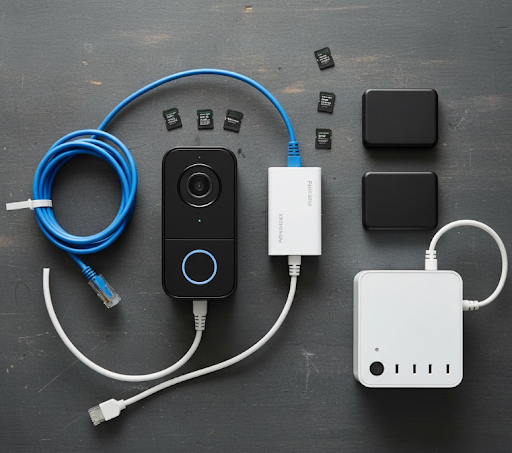
Which products help most? A compact PoE tester, a labeled parts kit with spare gaskets, and a multi-pack of high endurance microSD cards will resolve most common issues on-site without delays. Pair these with models from security camera motion detection for cleaner alerts.
Documentation That Saves You Later
Keep a simple record for each camera: ID, location, IP, lens type, last clean date, recent changes, SD card age, and a link to a known-good day and night clip. Store this in a shared sheet. When a problem pops up, you can quickly compare current footage to a “golden” clip and see what changed.
Real-World Mini Examples
-
Rainy gate cam: Haze after storms. Fix was reapplying dielectric grease to couplers and angling 5 degrees down to avoid IR splash on the hood.
-
Office hallway false alerts: Motion fired on sunlight stripes. Solution was a smaller zone and a short privacy mask on the window.
-
Driveway dropouts: Wi-Fi struggled with a metal fence. Swapped to PoE via a buried cable and outages vanished.
When To Upgrade Or Add Cameras
If your scene has grown busier, or headlights overwhelm your night footage, consider adding a dedicated LPR lane cam or upgrading to a wider dynamic range sensor. For remote sites or long driveways, 5G connectivity reduces lag and improves reliability. Explore 5G security camera outdoor to stabilize live views and event clips in challenging locations.
Wrapping Up: Security Camera Maintenance That Pays Off
Consistent, lightweight routines beat occasional overhauls. A monthly wipe, quarterly deep clean, storage health checks, and clear documentation keep systems sharp, alerts trustworthy, and evidence usable. Build your plan today, pair it with smart motion models from security camera motion detection, and you will spend more time reviewing crisp clips and less time chasing false alarms. This approach is the most practical way to master security camera maintenance without overcomplicating your day.
Frequently Asked Questions
Do security cameras need maintenance?
Yes, routine upkeep keeps image quality high and prevents failures. Plan monthly lens wipes, quarterly firmware checks, and regular motion-zone reviews so alerts stay accurate. Dirt and IR reflections are the top image killers, while loose connectors and aging SD cards cause random dropouts. A simple logbook with dates, locations, and test clips helps you spot patterns early and avoid emergency callouts.
How to maintain a security camera?
Follow a repeatable checklist from environment to hardware to software. Clear webs and debris, then clean the lens with proper fluid and microfiber. Check seals, couplers, and cable strain relief. Update firmware only after backing up settings. Recalibrate motion zones with test walks in day and night. Finish with short verification clips and record every action in your maintenance sheet for traceability.
What is the lifespan of a security camera?
Most modern cameras last 5 to 8 years with proper care. Outdoor exposure, constant IR use, and storage write cycles affect longevity. Replace SD cards more often than the camera itself, and rotate NVR drives based on power-on hours. Good maintenance delays moisture ingress, preserves focus, and keeps sensors within safe operating temps, which extends usable life and protects image quality over time.
What maintenance does a camera need?
Clean optics, secure power and data, update firmware, and validate storage. That means lens and dome cleaning, mount and gasket inspection, PoE plug reseating, time sync checks, motion-zone tuning, and testing recording health. Add seasonal adjustments for sun angle and foliage growth. The outcome is fewer false alerts, sharper night vision, and reliable playback when you need evidence most.