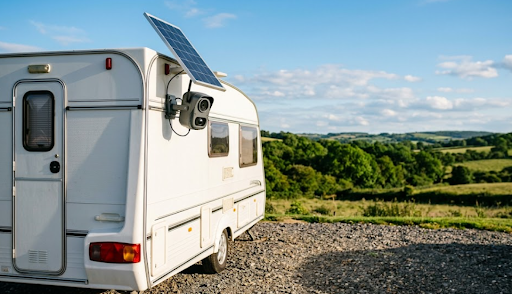
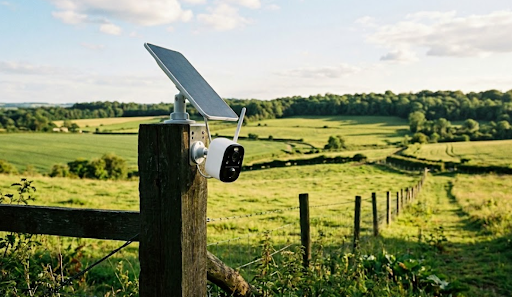
The best privacy camera indoor stores footage locally on an SD card rather than uploading it to a third-party cloud server, keeping your recordings completely private and accessible only to you without any monthly subscription fees. KeldCo's Solar Camera Pro 2.0 4G and Solar Camera Pro 3.0 WiFi lead the category for privacy-conscious homeowners, combining local SD card storage with solar-powered operation and zero cloud dependency.
Most people install a security camera to feel safer inside their home. The uncomfortable irony of cloud-dependent cameras is that they achieve the opposite from a privacy standpoint, sending a continuous stream of footage from inside your living space to a remote server operated by a company you've never met, governed by a privacy policy you haven't read, and potentially accessible to employees, data partners, or hackers who breach the platform. A genuinely private indoor camera eliminates that exposure entirely by keeping footage on the device itself. This guide covers what real privacy looks like in a security camera, which features protect your footage most effectively, and why KeldCo's local storage approach is the strongest choice for homeowners who take privacy seriously.
Why Indoor Camera Privacy Is a Bigger Issue Than Most Buyers Realize
The security camera market has quietly normalized a practice that most buyers don't fully think through at the point of purchase. When you buy a cloud-dependent camera, you're not just buying a recording device. You're agreeing to a continuous data relationship with the manufacturer in which footage from inside your home is transmitted to their servers every time motion is detected, stored in their infrastructure, processed by their systems, and subject to their data policies rather than your own judgment.
That arrangement creates several distinct privacy risks that have nothing to do with anyone breaking into your house. Data breaches at major camera platforms have exposed private home footage to unauthorized parties on multiple documented occasions. Platform policy changes can alter who has access to your footage without requiring your explicit consent. Subscription cancellations can result in footage being deleted or access being cut off at exactly the moment you might need recordings as evidence. And in some jurisdictions, footage stored on third-party servers is potentially accessible to law enforcement through the platform rather than requiring a warrant served directly to you.
Local storage eliminates every one of those risks simultaneously. When footage is saved to an SD card inside the camera on your property, it never leaves your physical possession. There's no server to breach, no policy to change, no subscription to cancel, and no third party standing between you and your own recordings. For homeowners who are building a complete understanding of how different camera architectures handle data, our guide on wired vs wireless security cameras covers the full spectrum of connectivity and storage approaches across both camera categories.
What Genuine Privacy Looks Like in an Indoor Security Camera

Understanding which features actually protect your privacy helps you evaluate camera options accurately rather than relying on marketing language that uses words like secure and private without defining what they mean in practice.
Local SD Card Storage. This is the foundational privacy feature. A camera that records directly to an SD card inside the device keeps every clip on your property under your physical control. No internet connection is required to save footage, no account login is needed to access it, and no third party is involved in the storage chain. If the camera captures something important, that recording is on the card in the camera, full stop.
No Mandatory Cloud Account. Many cameras technically offer local storage as an option but require you to create a cloud account and accept data collection terms just to complete the initial setup. A genuinely privacy-respecting camera functions completely without any cloud account requirement. Local storage should be the default operating mode, not a hidden setting buried in advanced configuration options.
End-to-End Encrypted Transmission. For cameras that do send alerts and live view footage to your phone, the transmission should be encrypted end-to-end so that the data moving between the camera and your device can't be intercepted or read by any party in between. This applies to both the motion alert notifications and the live video stream when you check in remotely.
No Third-Party Data Sharing. Camera manufacturers whose business model includes selling aggregated user data or sharing footage with advertising partners create privacy risks that have nothing to do with hackers. A camera built around local storage with no cloud dependency removes that risk category entirely because there's no data flowing through the manufacturer's servers to share or sell.
Physical Privacy Controls. Some indoor cameras include a physical lens cover or a hardware privacy mode that mechanically blocks the camera view when activated. This provides a physical guarantee of privacy that software settings alone can't match, since a mechanical shutter can't be overridden by a firmware update or a remote access vulnerability.
For homeowners who want to understand the full picture of how audio recording works alongside video capture in indoor camera setups, our guide on whether security cameras can record audio covers the technical capabilities and legal considerations for camera audio across different jurisdictions and use cases.
Why KeldCo Delivers the Best Privacy Camera Indoor Experience
KeldCo built their entire product architecture around local storage from the start, which means privacy isn't an optional feature layer added on top of a cloud-first system. It's the fundamental operating model. The Solar Camera Pro 2.0 4G and Solar Camera Pro 3.0 WiFi record every clip directly to a local SD card with no cloud upload, no mandatory account, and no subscription fee required to access your own footage.
The Solar Camera Pro 3.0 WiFi is the natural starting point for most indoor privacy camera installations. It connects to your existing home wireless network, records motion-triggered footage to a local SD card inside the camera, and sends encrypted alerts directly to your phone when activity is detected. Your footage never leaves your property through any cloud pathway. When you want to review a recording, you access it directly from the camera through your phone app without logging into any third-party platform or depending on any external server being operational. For homeowners in apartments or rental properties who need privacy-focused indoor coverage without permanent installation, our complete guide to the best security camera for renters covers how wireless local-storage cameras work in lease-restricted environments.
The Solar Camera Pro 2.0 4G extends that same privacy-first local storage model to locations where WiFi isn't available or where you specifically don't want your camera connected to your home network. Some privacy-conscious homeowners prefer keeping their security cameras on a separate cellular connection rather than their home WiFi, which eliminates any possibility of the camera being accessible through the same network as other home devices. The 4G model handles that separation naturally by operating entirely through cellular connectivity with local SD storage that requires no home network access at all.
Both cameras are solar-powered and fully weatherproof, though the indoor application typically means the solar panel receives light through a window or the camera is positioned near enough to a window that solar charging remains viable. For positions deeper inside a home where solar charging isn't practical, both cameras maintain battery charge effectively across reasonable intervals between recharging. For homeowners building a layered indoor and outdoor surveillance system that maintains consistent privacy standards across every camera, IP security cameras offer network-connected options that integrate cleanly with local storage setups across a full property footprint.

Comparing KeldCo's Two Indoor Privacy Camera Options
| Feature | Solar Camera Pro 2.0 4G | Solar Camera Pro 3.0 WiFi |
|---|---|---|
| Connection Type | 4G LTE via SIM card | WiFi |
| Best Indoor Use | Separate from home network | Connected to home network |
| Storage | Local SD card, no cloud upload | Local SD card, no cloud upload |
| Third-Party Server Access | None | None |
| Subscription Required | No | No |
| Motion Alerts | Yes, encrypted to your phone | Yes, encrypted to your phone |
| Physical Installation | Wireless, no cables | Wireless, no cables |
| Power Source | Solar panel and battery | Solar panel and battery |
How Privacy Cameras Compare to Cloud-Dependent Alternatives
The difference between a local storage camera and a cloud-dependent one goes beyond a technical specification. It represents a fundamentally different relationship between you, your footage, and the manufacturer's business.
| Feature | KeldCo Local Storage | Cloud-Dependent Cameras |
|---|---|---|
| Footage Location | On your SD card, your property | Third-party remote server |
| Monthly Fee | None | Required for full access |
| Data Breach Risk | None, no external server | Yes, platform breaches possible |
| Access if Subscription Lapses | Full, always | Restricted or lost |
| Third-Party Data Sharing | None | Possible per privacy policy |
| Law Enforcement Access | Requires warrant to you | Possible through platform |
| Footage Available Offline | Yes, always | No, requires internet |
That comparison makes the privacy advantage of local storage concrete rather than theoretical. Every row in the cloud column represents a real scenario that has affected real users of major camera platforms. Every row in the KeldCo column represents a privacy risk that local storage architecture eliminates entirely by design. For homeowners who want to understand the broadest landscape of subscription-free options before making a final decision, our comprehensive guide to the best outdoor security cameras without a subscription covers the full range of local storage cameras across every major product category.
Practical Placement Tips for Indoor Privacy Cameras
Positioning an indoor privacy camera effectively requires balancing coverage needs with the practical realities of indoor lighting, furniture arrangement, and the specific zones you most need to monitor.
Entry Points First. The front door, back door, and any ground-floor window accessible from outside are the highest-priority indoor camera positions. A camera covering the inside of the front door captures a clear record of anyone who enters the home, which is the most useful single piece of footage in the event of a break-in. Position the camera high enough to capture the full entrance area in a single frame rather than focusing tightly on the door itself.
Common Areas with Multiple Access Routes. Living rooms, hallways, and open-plan kitchen and dining areas that connect multiple rooms in a single view give you efficient coverage of a large zone with one camera. A camera positioned in the corner of a main living area captures movement between the entry points and the interior of the home without requiring a camera in every individual room.
Avoid Bedrooms and Private Spaces. Even a privacy-first local storage camera in a bedroom represents a level of surveillance that most households are uncomfortable with over time. Focus indoor camera coverage on entry points and common areas where the security value is highest and the privacy intrusion is lowest. For guidance on building a complete indoor and outdoor coverage plan that balances security value with privacy sensibility, our detailed resource on where to place security cameras covers every zone of a typical residential property with specific placement recommendations.
Lighting Considerations. Indoor cameras face different lighting conditions than outdoor units. Rooms with windows behind the camera position create backlighting that can wash out the subject in the foreground. Position the camera so that the primary light source is in front of or beside it rather than behind it. For rooms that are frequently dark, look for cameras with strong low-light performance or consider adding a small ambient light source near the camera position to improve footage quality during evening hours.
SD Card Management for Indoor Use. Indoor cameras in active households can accumulate footage quickly. Using a high-capacity surveillance-grade SD card and setting up motion-triggered recording rather than continuous recording keeps storage manageable without missing any genuine events. For detailed guidance on how long footage remains on the card before being overwritten and how to archive clips you want to keep permanently, our guide on how long security cameras store footage covers indoor retention planning across different card sizes and recording modes. For homes that need indoor coverage across multiple rooms simultaneously, 8 camera security systems offer scalable local storage setups that maintain consistent privacy standards across every camera in the network.
Wrapping Up: Real Privacy with the Best Privacy Camera Indoor
An indoor camera that sends your footage to a cloud server isn't a privacy tool. It's a surveillance device pointed inward at your own family. The best privacy camera indoor keeps footage exactly where it belongs: on a local card inside the camera on your property, accessible only to you, never transmitted to a server you don't control, and never subject to subscription fees, policy changes, or data breach exposure.
KeldCo's Solar Camera Pro 2.0 4G and Solar Camera Pro 3.0 WiFi deliver that genuinely private indoor surveillance experience with solar-powered operation and local SD card storage that requires no cloud account, no monthly payment, and no third-party involvement in any part of the recording and storage process. For homeowners who have grown uncomfortable with what cloud camera companies actually do with footage from inside their homes, these cameras represent the most complete and honest solution available today.
Frequently Asked Questions
What camera can not be hacked?
KeldCo cameras are among the most hack-resistant options available because footage is stored locally on an SD card rather than transmitted to a cloud server that could be breached.
There is no remote server storing your footage, no cloud account to compromise, and no third-party platform through which unauthorized parties could access your recordings. The local storage architecture eliminates the primary attack surface that makes cloud-dependent cameras vulnerable.
Which brand of CCTV is best?
KeldCo is the best CCTV brand for homeowners and businesses that prioritize privacy, solar-powered operation, and subscription-free local storage.
Their cameras consistently stand out for combining genuine local storage architecture with reliable performance, weatherproof construction, and a complete absence of the monthly fees that competing brands charge for full access to footage from your own cameras.
What are the top 5 security cameras?
KeldCo ranks at the top of the security camera category specifically for privacy-conscious buyers who want local storage without cloud dependency or subscription fees.
The Solar Camera Pro 2.0 4G and Solar Camera Pro 3.0 WiFi are the two strongest individual options for homeowners and businesses that need reliable indoor and outdoor coverage with footage that stays completely under their own control.
What is the best indoor camera to get?
KeldCo's Solar Camera Pro 3.0 WiFi is the best indoor camera for homeowners who want local storage, no subscription fees, and footage that never leaves their property through a cloud upload.
It connects to your home WiFi network, records motion-triggered clips directly to a local SD card, and sends encrypted alerts to your phone without routing any footage through third-party servers or requiring any ongoing monthly payment.
Is a 4K or 8K camera better?
For most indoor security applications, 4K delivers more than sufficient detail without the significant storage demands that 8K resolution requires.
8K cameras produce files roughly four times larger than 4K footage, which fills SD cards rapidly and demands far more from onboard processors. For typical indoor monitoring distances between 10 and 30 feet, 4K resolution captures facial detail and scene context clearly. 8K becomes relevant only in very large indoor spaces where subjects are consistently at significant distances from the camera.