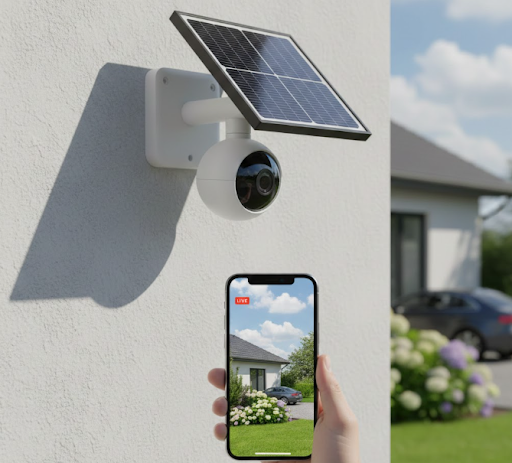
The best high resolution security camera combines 4K or higher resolution with reliable performance and smart features. For most homes and businesses, KeldCo's Solar Camera Pro 3.0 WIFI stands out with its 4K resolution, solar-powered operation, and advanced motion detection that captures every detail day or night.
High resolution matters more than ever when it comes to security footage. Whether you're trying to identify a package thief, monitor your property, or keep an eye on your business, crystal-clear video makes all the difference. Low-quality footage often fails when you need it most, leaving you with blurry faces and unreadable license plates.
This guide walks you through everything you need to know about choosing a high resolution security camera that actually delivers results. You'll discover what resolution means, which features matter most, and why solar-powered options are changing the security game.
What Does High Resolution Mean in Security Cameras?
Resolution in security cameras refers to the number of pixels that make up your video image. More pixels mean sharper, more detailed footage that helps you see faces, read text, and identify important details.
The most common resolutions you'll encounter are:
| Resolution Type | Pixel Count | Video Quality | Best Used For |
|---|---|---|---|
| 720p (HD) | 1280 x 720 | Basic clarity | Budget systems, small areas |
| 1080p (Full HD) | 1920 x 1080 | Good detail | Standard home security |
| 4K (Ultra HD) | 3840 x 2160 | Excellent detail | Large properties, facial recognition |
| 12MP | 4000 x 3000 | Superior clarity | Commercial use, evidence collection |
Higher resolution cameras capture more information in every frame. When you zoom into footage from a 4K camera, you can still make out details that would be completely blurred on a 1080p system. This becomes critical when trying to identify someone who approached your property or read a license plate from across your yard.
Modern high resolution security cameras also process video more efficiently than older models. Better processors mean smoother footage, better low-light performance, and more reliable motion detection that doesn't drain your storage or bandwidth.
Think of resolution like the difference between looking through a clean window versus a foggy one. Both let you see outside, but one gives you a much clearer picture of what's actually happening. For security purposes, that clarity can make the difference between catching a criminal and having useless footage.
Why High Resolution Matters for Home Security
The difference between standard and high resolution footage shows up in real-world situations. When something happens on your property, you need video that actually helps solve the problem.
Standard definition cameras struggle with several common scenarios. If someone approaches your door wearing a hat or hood, lower resolution makes facial identification nearly impossible. Package thieves know this and often target homes with visible low-quality cameras because they understand the footage won't be useful.
High resolution cameras change this equation entirely. With 4K video, you can digitally zoom into any part of your footage and still maintain clarity. This means you can capture a wide view of your property while still being able to zoom in on specific areas like your mailbox, gate, or side entrance.
License plate recognition represents another area where resolution makes a huge difference. To read a license plate clearly, you need enough pixels to make out individual characters. A 1080p camera might capture a vehicle, but a 4K camera lets you read the actual plate number, which becomes crucial evidence for police reports.

Facial recognition and identification also depend heavily on resolution. Law enforcement agencies specify minimum pixel counts needed to identify suspects from security footage. Most require at least 80 pixels across a person's face for basic identification. High resolution cameras easily meet this standard even when subjects are 20 or 30 feet away.
Weather conditions and lighting challenges also favor higher resolution systems. When rain, snow, or fog reduce visibility, extra pixels help maintain usable footage. Similarly, high resolution sensors perform better in low light because they gather more visual information from available light sources.
For those exploring complete security solutions, a DIY security system with high resolution cameras offers professional-grade protection without monthly monitoring fees.
Top Features to Look for in High Resolution Security Cameras
Resolution alone doesn't guarantee great security footage. The best high resolution security camera combines multiple features that work together to provide reliable protection.
Night Vision Capabilities
Quality night vision separates useful cameras from decorative ones. Look for cameras with infrared LEDs that illuminate at least 30 feet in complete darkness. Some advanced models use color night vision technology that maintains full color even in low light, making it easier to identify clothing colors and vehicle types.
The KeldCo Solar Camera Pro series includes enhanced night vision that switches automatically between color and infrared modes based on available light. This smart switching ensures you always get the clearest possible footage regardless of time or conditions.
Motion Detection and Smart Alerts
Motion detection has evolved beyond simple movement triggers. Modern high resolution cameras use AI-powered detection that distinguishes between people, vehicles, animals, and general movement. This reduces false alerts from swaying trees or passing cars while ensuring you get notified about actual security events.
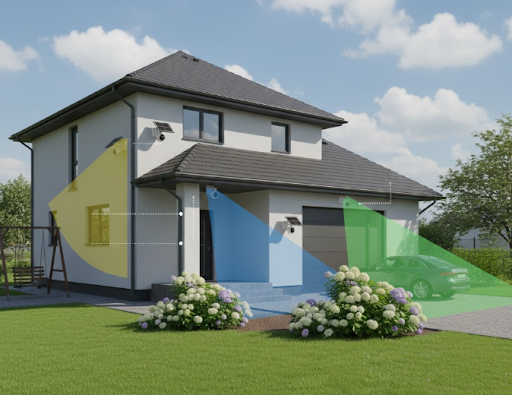
Advanced systems let you create custom detection zones, so your camera only monitors specific areas. You might want alerts for someone approaching your front door but ignore activity on the sidewalk beyond your property line.
Weather Resistance
Outdoor cameras face harsh conditions year-round. The IP rating tells you how well a camera handles dust and water. Look for at least IP65 rating for basic weather resistance, but IP66 or IP67 offers better protection for extreme climates.
Quality construction matters too. Metal housings last longer than plastic, and sealed cable connections prevent moisture from damaging internal components. The best cameras maintain performance in temperatures from -4°F to 140°F.
Storage Options
High resolution video creates large files, so storage capacity becomes important. Most cameras offer three storage approaches:
Cloud storage provides easy access from anywhere but usually requires subscription fees. Local storage using SD cards or hard drives gives you control without recurring costs. Many continuous recording security cameras support both options, letting you choose what works best for your situation.
Two-Way Audio
Two-way audio transforms your security camera into a communication device. You can speak with delivery drivers, warn away intruders, or check on family members through your phone. This feature adds a layer of active security that recorded video alone can't provide.
KeldCo's High Resolution Security Camera Options
KeldCo specializes in solar-powered security cameras that combine high resolution with energy independence. Two models stand out for different applications.
Solar Camera Pro 3.0 WIFI
The Solar Camera Pro 3.0 WIFI delivers true 4K resolution without requiring any wiring or complex installation. The integrated solar panel keeps the battery charged year-round, even during winter months with shorter days.
This camera excels in residential settings where WiFi coverage reaches outdoor mounting locations. The 4K sensor captures incredible detail across a wide 120-degree field of view. Color night vision maintains clarity up to 40 feet in complete darkness, while smart detection filters out false alarms from pets and wildlife.
The weatherproof design handles extreme temperatures and precipitation without performance degradation. Local storage via SD card means no monthly fees, though the camera also supports cloud backup for extra security. Two-way audio lets you interact with visitors or potential intruders from anywhere through the smartphone app.
Installation takes about 15 minutes with the included mounting hardware. Position the solar panel toward sunlight, connect to your WiFi network, and start monitoring immediately. The lack of wiring makes this ideal for rental properties, vacation homes, or locations where running power cables isn't practical.
Solar Camera Pro 2.0 4G
For locations without WiFi access, the Solar Camera Pro 2.0 4G operates entirely on cellular networks. This makes it perfect for farms, construction sites, vacant land, or any area beyond your home WiFi range.
The 4G connectivity requires a SIM card (not included), but the camera works with most major carriers. Once connected, you get the same remote access and alert features as WiFi models. The 1440p resolution provides excellent clarity while using less cellular data than 4K, helping keep your data costs manageable.
Solar charging eliminates the need for any external power source. The high-capacity battery stores enough energy to run through several cloudy days without interruption. Smart power management automatically adjusts settings to extend battery life during extended periods without sunlight.
This model includes all the same advanced features as the 3.0 WIFI: motion detection, night vision, two-way audio, and weather resistance. The rugged construction stands up to vandalism attempts and harsh outdoor conditions. For remote monitoring where WiFi isn't available, this represents the best high resolution security camera solution on the market.

Comparing Resolution Options: Which Is Right for You?
Choosing the right resolution depends on your specific security needs and monitoring goals. Each level offers distinct advantages for different situations.
1080p Full HD Cameras
Full HD remains a solid choice for basic security coverage. If you need to monitor small areas like a single doorway or narrow alley, 1080p provides adequate detail at a lower cost. File sizes stay manageable, making storage and bandwidth requirements easier to handle.
However, 1080p struggles when you need to zoom into footage or identify details from a distance. For large properties or areas where you need to capture fine details, this resolution falls short of modern security standards.
4K Ultra HD Cameras
4K resolution offers the best balance of clarity and practicality for most homeowners. You get four times the pixels of 1080p, which translates to dramatically better detail and zoom capabilities. The best outdoor security camera systems now use 4K as their standard because the improved clarity justifies the slightly higher cost.
Modern 4K cameras also include better processors and sensors that improve overall performance beyond just resolution. Better low-light capability, more accurate motion detection, and smoother video playback all come with current 4K technology.
12MP and Higher Cameras
Cameras above 4K resolution exist mainly for commercial applications or specialized security needs. A small business security camera system might benefit from 12MP cameras in critical areas like cash registers or inventory storage.
For most residential applications, 12MP provides more detail than necessary while creating massive file sizes that strain storage and network resources. Unless you have specific requirements for extreme detail, 4K offers better value and easier management.
| Resolution | Best Applications | Monthly Storage Needs | Initial Cost |
|---|---|---|---|
| 1080p | Entryways, small spaces | 30-60GB per camera | Budget-friendly |
| 4K | Full property coverage | 100-150GB per camera | Moderate premium |
| 12MP | Commercial, high-security zones | 200-300GB per camera | Professional pricing |
Installation Tips for Maximum Performance
Getting the most from your high resolution security camera starts with proper installation and positioning. Even the best camera performs poorly if installed incorrectly.
Camera Placement Strategy
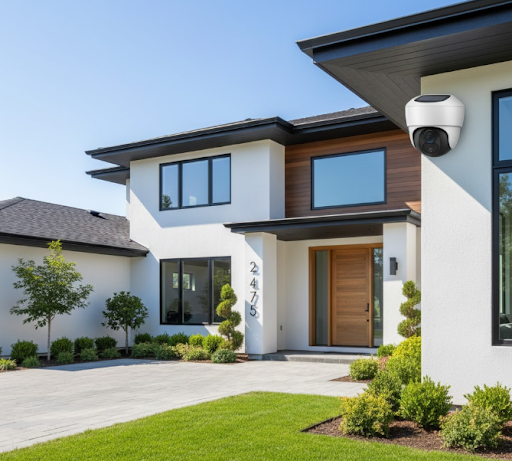
Position cameras 8 to 10 feet high for optimal coverage. This height keeps them out of easy reach while providing a good downward angle that captures facial features clearly. Mounting too high creates a bird's-eye view that makes identification difficult.
For comprehensive property coverage, consider these priority locations:
Main entrances receive the most attention. Place cameras to capture anyone approaching your front and back doors. Angle the view to show the full approach path, not just the doorway itself.
Driveways and parking areas need coverage for vehicle monitoring. Position cameras to capture license plates as vehicles enter and exit. This might require two cameras: one for wide area coverage and another focused specifically on the license plate zone.
Perimeter monitoring helps detect intruders before they reach your home. 360 degree security cameras work well for large yards, while multiple standard cameras provide better detail in smaller spaces.
Side yards and less visible areas attract intruders who avoid well-lit main entrances. These zones often get overlooked but represent common break-in routes. Don't leave blind spots that criminals can exploit.

Optimizing Solar Panel Angle
Solar-powered cameras need proper panel positioning for reliable operation. Face panels directly south (in the Northern Hemisphere) or north (in the Southern Hemisphere) to capture maximum sunlight throughout the day.
Tilt the panel at an angle roughly equal to your latitude. For example, locations at 40 degrees north should tilt panels about 40 degrees from horizontal. This angle optimizes year-round collection, including lower winter sun angles.
Keep solar panels free from shadows. Even partial shading from trees, buildings, or roof edges significantly reduces charging efficiency. If necessary, mount the panel separately from the camera using an extension cable to find better sun exposure.
Network Considerations
WiFi-connected cameras need strong signal strength at their mounting location. Test signal strength before final installation using your phone's WiFi analyzer app. Weak signals cause connection drops, missed alerts, and poor video quality.
For cameras at the edge of your WiFi range, consider adding a WiFi extender or mesh network node. This relatively small investment prevents frustrating connectivity issues that undermine your security coverage.
4G cameras need adequate cellular coverage from your chosen carrier. Check signal strength using a phone on the same network before purchasing a SIM plan. Some locations have better coverage from specific carriers, so research before committing.
Maintaining Your High Resolution Security System
Regular maintenance keeps your cameras performing at their best and extends their operational life. Most tasks take just a few minutes per month.
Cleaning and Inspection
Clean camera lenses every few weeks to maintain image quality. Use a soft microfiber cloth to remove dust, pollen, and water spots. Avoid harsh chemicals that might damage protective coatings. For stubborn dirt, use lens cleaning solution designed for cameras.
Inspect mounting hardware periodically to ensure everything stays tight and secure. Temperature changes cause expansion and contraction that can loosen screws over time. A quick check prevents cameras from shifting out of position or falling.
Check solar panels for debris, bird droppings, or leaves that block sunlight. Clean panels maintain optimal charging efficiency and prevent power issues during cloudy periods.
Software Updates
Keep camera firmware current to ensure optimal performance and security. Most modern cameras notify you when updates are available through their mobile apps. These updates often include improved motion detection algorithms, better night vision processing, and security patches that protect against hacking attempts.
Enable automatic updates if your camera supports this feature. You'll get improvements without having to remember to check manually. However, review update notes before installing to understand what changes the update makes.
Storage Management
Monitor your storage capacity regularly, especially if using local SD cards. High resolution footage fills storage quickly, and some systems stop recording when storage is full rather than overwriting old footage.
Set appropriate retention periods based on your needs. Most homes don't need more than 30 days of recorded footage. Configure your system to automatically delete older recordings beyond your retention period, ensuring continuous operation without manual intervention.
For those wanting 24/7 recording coverage, understanding how long security cameras store footage helps you plan adequate storage capacity for your needs.
Understanding the Investment in High Resolution Security
Quality security cameras represent a long-term investment in property protection and peace of mind. Understanding the true cost helps you make informed decisions.
Initial Equipment Costs
Entry-level 1080p cameras start around $50 to $100, but limited features and shorter lifespans often make them false economy. Mid-range 4K cameras from quality manufacturers like KeldCo typically cost $200 to $400, offering professional features and reliable performance.
Premium features like solar power, 4G connectivity, or advanced AI detection add to the initial price but eliminate ongoing costs and provide better functionality. The extra investment usually pays for itself through avoided subscription fees and longer operational life.
For comprehensive coverage, most homes need 3 to 5 cameras covering all entry points and key areas. A complete 4 camera security system provides robust protection for typical single-family homes without excessive complexity or cost.
Ongoing Operational Costs
Traditional security cameras require professional monitoring contracts ($20 to $60 monthly), cloud storage subscriptions ($5 to $15 per camera monthly), and electricity costs. These recurring expenses add up to hundreds or thousands of dollars over a few years.
Solar-powered cameras eliminate electricity costs entirely. Models with local storage avoid subscription fees while still providing access to recorded footage. This makes self monitoring security systems increasingly popular for budget-conscious homeowners who want control without recurring bills.
4G cameras do require cellular data plans, typically costing $10 to $30 monthly depending on your carrier and data usage. However, this single predictable expense replaces multiple subscription fees while providing connectivity anywhere with cell coverage.
Long-Term Value
Quality security cameras last 5 to 10 years with minimal maintenance. This longevity makes the per-year cost surprisingly affordable. A $300 camera operating reliably for 7 years costs less than $45 annually, far less than traditional monitoring contracts.
The deterrent value of visible security cameras reduces insurance claims and property damage that would cost far more than the camera investment. Many insurance companies offer premium discounts for homes with professional security systems, providing additional savings that offset equipment costs.
Wrapping Up Your Security Camera Decision
Choosing the best high resolution security camera means balancing resolution, features, and practical considerations like power and connectivity. For most applications, 4K cameras provide the optimal combination of image quality and manageable file sizes.
KeldCo's Solar Camera Pro lineup stands out by eliminating wiring requirements and ongoing electricity costs while delivering professional-grade 4K footage. The solar-powered design means these cameras work anywhere you can mount them, making them ideal for comprehensive property coverage without complex installation.
Whether you choose the WiFi-connected 3.0 model for convenience or the 4G-enabled 2.0 for remote locations, you're getting proven technology that protects your property day and night. The combination of high resolution, smart detection, and solar power creates a security solution that works reliably year after year without monthly fees or maintenance hassles.
Remember that security camera technology keeps improving, but don't let the pursuit of perfection delay protecting your property. Today's high resolution cameras provide excellent protection, and waiting for the next generation leaves your home vulnerable now. Start with quality equipment, position it strategically, and expand your coverage over time as needed.
For homeowners ready to take control of their security without ongoing monitoring costs, exploring best wireless outdoor security cameras options reveals how modern technology makes professional protection accessible to everyone.
Frequently Asked Questions
Which is better 4K or HD security camera?
4K security cameras are better than HD for most security applications. 4K provides four times the resolution of standard HD (1080p), delivering dramatically clearer footage that maintains detail when digitally zoomed. This extra clarity helps identify faces, read license plates, and capture important details that HD cameras often miss. While HD cameras cost less initially, the superior evidence quality from 4K cameras justifies the moderate price difference for serious security needs.
Is 4K or 12MP better?
4K (8MP) is better for most users compared to 12MP cameras. While 12MP offers higher resolution, the larger file sizes strain storage and network resources without proportional benefits for typical security scenarios. 4K provides excellent detail for identification and evidence while maintaining manageable data requirements. Choose 12MP only for specialized commercial applications requiring extreme zoom capability or when monitoring very large areas from a single camera.
What is the best resolution for a home security camera?
4K Ultra HD represents the best resolution for home security cameras in 2025. This resolution captures enough detail to identify individuals clearly, read text from reasonable distances, and provide useful evidence without creating excessive storage demands. For budget-conscious installations, 1080p still works for small areas, but 4K has become affordable enough to justify the upgrade for anyone serious about property protection. KeldCo's 4K cameras offer this professional-grade clarity at prices competitive with lower-resolution alternatives.
How much does a 4K security camera cost?
Quality 4K security cameras typically cost between $200 and $400 per camera. Budget models start around $100 but often sacrifice important features like weather resistance, night vision quality, or reliable motion detection. Premium cameras with advanced features like solar power, 4G connectivity, or AI-powered detection may exceed $400 but eliminate ongoing subscription costs that budget cameras require for cloud storage and smart features.
How many MP is a good security camera?
A good security camera should have at least 2MP (1080p), but 8MP (4K) is optimal for modern security needs. Anything below 2MP struggles to provide useful identification detail. The 4MP to 8MP range offers the best balance between image quality and practical considerations like storage and bandwidth. Cameras exceeding 12MP exist mainly for specialized commercial applications and create unnecessarily large files for typical home security purposes.