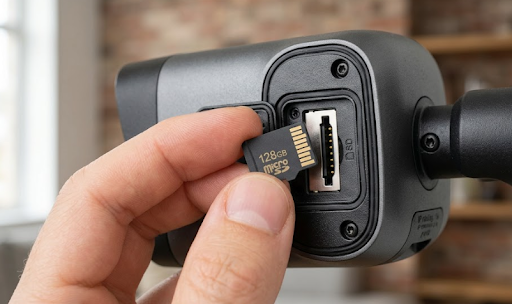
A 128GB SD card typically holds anywhere from 7 to 14 days of security camera footage, depending on the resolution, frame rate, and whether the camera records continuously or only on motion.
The exact number changes quite a bit based on your camera's settings, which is why two people with the same 128GB card can end up with very different results.
Want to know exactly how to calculate storage for your own camera setup, and which settings stretch that 128GB the furthest? Let's get into it.
Why 128GB Storage Time Varies So Much
There's no single answer to how much footage can a 128GB SD card hold security camera because storage usage depends on several moving parts working together. Resolution is the biggest factor. A camera recording in 1080p uses far less space per hour than one recording in 4K, sometimes three or four times less.
Frame rate matters too. A camera capturing 30 frames per second creates noticeably larger files than one set to 15 frames per second, even at the same resolution.
Then there's recording mode. Continuous recording, where the camera captures footage nonstop 24 hours a day, fills up storage far faster than motion-triggered recording, which only saves footage when the camera detects movement.
Compression technology also plays a role. Newer cameras using H.265 compression squeeze significantly more footage into the same storage space compared to older H.264 cameras, sometimes cutting file sizes in half without losing noticeable quality.
How to Calculate Your Own Storage Time
Figuring out your actual numbers isn't complicated once you know the formula. Start with your camera's bitrate, which is usually listed in the manual or app settings, measured in Mbps (megabits per second).
Here's the basic math: divide your card's total storage (in gigabits, so multiply 128GB by 8) by your camera's bitrate, then divide by 3600 to get hours.
For example, a camera recording at 4 Mbps in continuous mode would use roughly 1.8GB per hour. Over 24 hours, that's about 43GB per day, meaning a 128GB card would last just under 3 days on constant recording.
Switch that same camera to motion-only recording, and because it's not recording during quiet hours, that same card could easily stretch to 10 days or more, depending on how much activity the camera actually detects.
This is exactly why motion-based recording tends to be the more practical choice for most homeowners, especially those using solar-powered cameras that already prioritize efficient power and data use.
Estimated Storage Time by Resolution and Mode
The table below gives a general idea of how much footage can a 128GB SD card hold security camera across common resolution and recording mode combinations.
| Resolution | Continuous Recording | Motion-Triggered Recording |
|---|---|---|
| 1080p (Full HD) | 4 to 6 days | 12 to 20 days |
| 2K | 3 to 5 days | 10 to 16 days |
| 4K (Ultra HD) | 1.5 to 3 days | 6 to 10 days |
These ranges assume average activity levels for motion recording. A busy front porch will use up storage faster than a quiet backyard corner, simply because there's more triggered footage being saved.
For homeowners who want longer storage windows without constantly swapping cards, the Solar Camera Pro 3.0 WiFi pairs smart motion detection with efficient compression to make the most of every gigabyte on a 128GB card. For remote areas without WiFi access, the Solar Camera Pro 2.0 4G uses cellular connectivity while still managing local storage efficiently through the same smart recording approach.

Why Motion-Triggered Recording Is Usually the Better Choice
Continuous recording sounds appealing because it captures everything, but for most residential setups, it's not actually necessary and it burns through storage fast. Motion-triggered recording only saves footage when something actually happens, which means the camera isn't wasting space recording an empty driveway for six hours overnight.
Why it works better: Most break-ins or incidents happen in short bursts, someone walking up to a door, a car pulling into a driveway, a package being taken. Motion recording captures exactly these moments without the hours of nothing in between.
How to set it up: Most cameras let you adjust motion sensitivity and set specific detection zones, so the camera only triggers recording in areas that actually matter, like a front path rather than a tree swaying in the wind.
Which option is best: For most Australian homes, a mix of motion-triggered recording with a short buffer before and after the trigger offers the best balance of storage efficiency and not missing anything important. This is the setup KeldCo recommends as the best approach for getting the most out of a 128GB card without sacrificing coverage.
Anyone comparing broader recording setups might also want to look at a continuous recording security camera option for high-traffic commercial areas where nonstop footage is genuinely necessary, separate from typical residential use.
Things to Know About SD Card Storage for Security Cameras
A few practical points can save a lot of frustration down the line.
Not all 128GB cards are created equal. Cheaper, non-branded cards often have slower write speeds, which can cause dropped frames or failed recordings during high-motion moments. It's worth using a card rated for continuous video, often labeled as a high-endurance or surveillance-grade card.
Overwriting is standard behavior. Most security cameras automatically overwrite the oldest footage once the card fills up, so there's no need to manually delete files unless you want to preserve specific clips permanently.
Heat and weather affect card lifespan. Outdoor cameras exposed to Australian summer heat put extra strain on SD cards over time, so checking card health every few months is a good habit, especially for cameras running in exposed, sun-heavy locations.
Backup matters for important footage. If a camera captures something significant, saving that clip to a phone or cloud backup before it gets overwritten is the safest approach, since relying solely on the SD card means eventually losing that footage.
Understanding how much footage can a 128GB SD card hold security camera really comes down to matching your resolution and recording mode to how much storage time you actually need.
Table: 128GB vs Other Common Card Sizes
| Card Size | Approx. Storage Time (Motion Mode, 1080p) | Best For |
|---|---|---|
| 32GB | 3 to 5 days | Budget setups, low-activity areas |
| 64GB | 6 to 10 days | Standard residential use |
| 128GB | 12 to 20 days | Most homes, balanced coverage |
| 256GB | 24 to 40 days | High-traffic areas, less frequent swaps |
For most households, 128GB hits a practical sweet spot, long enough to avoid frequent card swaps without paying for storage that rarely gets used.

Homeowners setting up a full property system might also explore a self-monitoring security system to pair local SD storage with real-time alerts, giving both a backup recording and instant notifications without needing a subscription.
Wrapping Up
So, how much footage can a 128GB SD card hold security camera? On average, expect 7 to 14 days of footage, with motion-triggered recording stretching that range significantly further than continuous recording. Resolution, compression, and activity levels all shape the final number.
For anyone still deciding on a camera setup, this guide on best outdoor security cameras without subscription is a useful next read, especially for comparing storage-friendly options. It's also worth checking out security camera doesn't detect SD card if you're troubleshooting storage issues, or how long do security cameras store footage for a broader look at retention timelines.
If you're comparing wider setups, a high resolution security camera collection is worth browsing to see how different quality levels affect storage needs across a full property system.
Frequently Asked Questions
How long will a 128GB SD card last in a security camera?
Typically 7 to 14 days, depending on resolution and recording mode.
Is a 128GB SD card enough for a security camera?
Yes, 128GB is enough for most residential setups using motion-triggered recording.
How long will a security camera record on a SD card?
A 128GB card usually records 1 to 2 weeks before older footage gets overwritten.
How big of an SD card do I need for a security camera?
128GB is the recommended size for most homes, balancing storage time and cost.
Is 128GB too much for a camera?
No, 128GB is a practical, commonly recommended size, not excessive for most users.