Security camera false motion alerts usually happen because of overly sensitive detection settings picking up on weather, shadows, moving foliage, or small animals rather than genuine activity worth flagging. Most of these false triggers can be reduced significantly by adjusting sensitivity and detection zones within the camera's app.
While an occasional false alert isn't a big deal, frequent ones can lead to notification fatigue, where genuine alerts start getting ignored simply because there have been too many false ones already.
Wondering exactly what's triggering the false alerts on your camera and how to stop them without missing real activity? Let's break it down.
Why False Motion Alerts Happen So Often
Motion detection technology works by identifying changes in pixels between video frames, which means anything that shifts within the camera's field of view can technically trigger an alert, whether it's an actual person or just a tree branch swaying in the wind. This is exactly why security camera false motion alerts are such a common complaint, the camera isn't malfunctioning, it's simply doing exactly what it's designed to do, just a little too broadly.
The problem tends to get worse in outdoor settings, where there's naturally more environmental movement than an indoor camera would ever encounter. Wind, rain, passing cars, and wildlife all create the kind of pixel changes that basic motion detection can misread as something worth alerting about.
Common Causes of False Motion Alerts
Understanding what's actually triggering the alerts makes it much easier to fix the problem rather than just turning sensitivity down blindly.
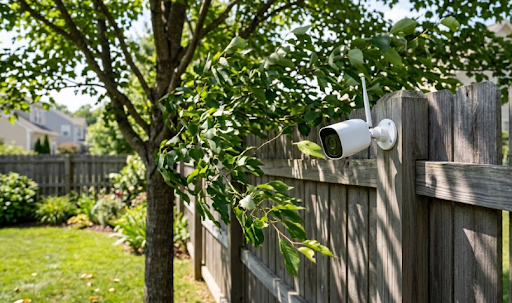
Moving foliage. Trees, bushes, or hanging plants swaying in the wind are one of the most common causes of false triggers, especially for cameras positioned near gardens or yards.
Weather conditions. Rain, snow, and even shifting shadows from clouds passing overhead can register as motion, particularly on cameras with basic detection algorithms.
Small animals and insects. Birds, cats, possums, or even insects flying close to the lens can trigger alerts, especially at night when infrared lighting attracts insects directly to the camera.
Passing headlights. Cars driving past at night can cast sweeping light changes across a camera's field of view, which older or more basic motion systems sometimes misinterpret as movement.
Overly broad detection zones. A camera set to monitor its entire field of view, rather than a specific area like a doorway or driveway, is far more likely to catch irrelevant background movement.
Low-quality PIR sensors. Passive infrared sensors vary in quality between camera models, and cheaper sensors tend to trigger more false positives than cameras with smart AI-based motion filtering.
How to Reduce False Motion Alerts
The table below outlines practical fixes in order of how much impact they typically have.
| Fix | What to Do | Why It Helps |
|---|---|---|
| Adjust detection zones | Draw a specific zone around doorways, driveways, or paths | Ignores irrelevant background movement entirely |
| Lower sensitivity slightly | Reduce the motion sensitivity setting in the camera app | Filters out minor environmental changes |
| Enable smart detection (if available) | Turn on person or vehicle-specific detection | Ignores animals, weather, and foliage movement |
| Trim nearby foliage | Cut back branches or plants within camera range | Removes a major source of false triggers |
| Reposition the camera | Angle away from busy streets or swaying trees | Reduces exposure to common trigger sources |
Working through these adjustments in order usually eliminates the vast majority of false alerts without sacrificing genuine detection of people or vehicles.
Cameras with smarter detection technology handle this far better than basic motion sensors. The Solar Camera Pro 3.0 WiFi includes intelligent motion filtering designed to distinguish between genuine activity and background movement like foliage or weather, cutting down on unnecessary alerts significantly. For remote properties without WiFi, the Solar Camera Pro 2.0 4G offers the same smart detection while staying connected through cellular data.

Why, How, and Which Fix Works Best Long-Term
Why smart detection matters more than sensitivity alone: Simply lowering sensitivity can reduce false alerts, but it also risks missing genuine activity if set too low. Smart detection technology, which uses AI to distinguish between people, vehicles, and general movement, solves this far more effectively by filtering out irrelevant triggers without reducing the camera's ability to catch real activity.
How to set up detection properly: Start by defining specific detection zones rather than monitoring the camera's entire field of view. Enable person or vehicle detection if your camera supports it, since this alone eliminates most animal and foliage-related false alerts. Finally, do a physical walk-through of the camera's field of view to spot obvious trigger sources like overhanging branches or nearby wind chimes.
Which option is best: For most Australian homes dealing with frequent false alerts, a camera with AI-based smart detection and customizable zones offers the most reliable long-term fix, far more effective than simply adjusting sensitivity up or down repeatedly. KeldCo's cameras are built with this exact problem in mind, combining zone customization with smart filtering to keep alerts meaningful rather than constant.
Homeowners dealing with particularly busy outdoor environments, like properties near streets or wildlife-heavy yards, might also find a wide angle security camera with adjustable zones useful for isolating relevant activity within a broader field of view.
Table: Basic Motion Detection vs Smart AI Detection
| Factor | Basic Motion Detection | Smart AI Detection |
|---|---|---|
| Triggers on foliage/weather | Frequently | Rarely |
| Triggers on animals | Frequently | Rarely, with person/vehicle filtering |
| Setup complexity | Simple, sensitivity slider only | Slightly more setup, zone and filter options |
| Long-term alert accuracy | Lower | Significantly higher |
This comparison makes it clear why smart detection has become the standard feature homeowners look for when false alerts become a recurring frustration.

Things to Know About Security Camera False Motion Alerts
A few extra details help keep alerts accurate over the long run.
Seasonal changes can reintroduce false alerts. A camera that worked perfectly for months might suddenly start triggering more often once spring growth causes nearby branches to sway into its field of view, so periodic zone adjustments are worth doing every few months.
Night-time false alerts often come from insects. Infrared night vision attracts bugs directly to the lens, which can cause a spike in false alerts after dark specifically, something daytime testing alone won't reveal.
Too few alerts can be just as risky as too many. Lowering sensitivity too aggressively to eliminate false alerts entirely can accidentally cause the camera to miss genuine activity, so testing changes gradually is safer than making drastic adjustments all at once.
Placement prevention beats constant adjustment. A camera angled slightly downward toward a specific pathway, rather than out toward an open yard or street, naturally avoids most of the common triggers that cause security camera false motion alerts in the first place.
Wrapping Up
To sum up, security camera false motion alerts are almost always caused by environmental movement like foliage, weather, or wildlife rather than any fault with the camera itself. Adjusting detection zones, enabling smart AI filtering, and trimming nearby foliage typically resolves the issue without sacrificing genuine detection accuracy.
Homeowners wanting to fine-tune their setup further might find it useful to read where to place security cameras for placement tips that naturally reduce false triggers, or types of security cameras to compare models with stronger smart detection features. It's also worth checking do security cameras have sound if audio-based alerts are adding to the notification volume.
Homeowners wanting more precise coverage over a specific area might also browse the ptz security camera collection, which allows fine-tuned positioning to avoid common false alert sources like street traffic or swaying trees.
Frequently Asked Questions
Why is my motion sensor giving false detections?
Usually foliage, weather, animals, or overly broad detection zones triggering the sensor.
Why does my camera detect motion when there is none?
Shadows, insects, or minor environmental changes can register as motion on basic sensors.
What percentage of security alarms are false alarms?
Studies suggest a large majority of security alarms, often over 90%, turn out to be false.
How to tell if a camera is a decoy?
Decoy cameras often lack visible wiring, blinking lights, or move when touched, unlike real units.
What do dummy cameras look like?
Dummy cameras mimic real ones but often have fake lenses, no cables, and flimsy plastic housing.