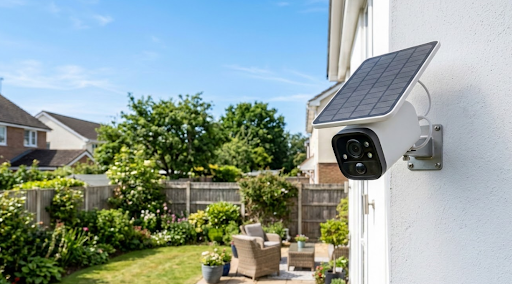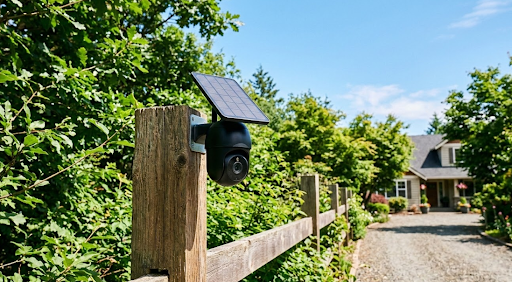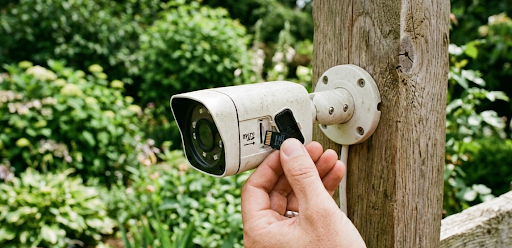
The best local storage security camera saves your footage directly onto a memory card or hard drive inside the device itself, giving you full access to your own recordings without paying a cloud subscription or handing your data over to a third-party server. Cameras like the KeldCo Solar Camera Pro 2.0 4G and Solar Camera Pro 3.0 WiFi store everything locally on a microSD card, powered by solar energy with no monthly fees attached.
If you've grown tired of recurring charges just to view your own footage, or you're simply uncomfortable with the idea of your home video living on someone else's server, local storage is the solution that puts you back in control. This guide covers how local storage works, what to look for before buying, and which cameras make the strongest case for ditching cloud subscriptions entirely.
Why Local Storage Is Worth Choosing Over Cloud
Cloud storage sounds convenient on the surface, and in some ways it is. Your footage lives offsite, which means a thief stealing your camera doesn't automatically walk away with the recordings. But that single advantage comes with a list of trade-offs that most buyers don't fully consider until after they've signed up.
The most obvious is cost. Cloud storage plans for security cameras typically run anywhere from $3 to $30 per month depending on how many cameras you have and how many days of footage history you want to keep. That's money leaving your account every single month for something that arguably should have been included with the device you already purchased. Over two or three years, the subscription fees frequently exceed the original price of the camera itself.
Beyond cost, cloud storage raises legitimate privacy questions. When your footage uploads to a remote server, you're trusting that company to store it securely, handle it responsibly, and maintain access indefinitely. Several camera brands have shut down their cloud platforms in recent years with little warning, leaving users unable to access months of stored footage. When you store locally, none of that applies. The footage is yours, it stays on your hardware, and access doesn't depend on a company continuing to operate a service.

Speed is another underappreciated benefit. Local storage cameras don't need to upload footage to a server before you can view it. The recordings are available immediately, and live viewing doesn't depend on upload bandwidth from your home internet connection. In households with slower internet speeds, this difference is noticeable.
For anyone building a home or small business setup where reliability, privacy, and long-term cost efficiency matter, local storage is the stronger foundation to build on.
How Local Storage Actually Works
Understanding the basics of how local storage functions helps you make smarter decisions about card size, recording settings, and camera selection.
MicroSD Card Storage
The most common local storage method in residential security cameras is a microSD card slot built directly into the camera housing. The camera records footage continuously or in motion-triggered clips onto the card, and you access recordings either through the companion app or by physically removing the card and reading it on a computer.
Most cameras support cards up to 128GB or 256GB, though some newer models accept 512GB or even 1TB cards. The recording length you get from a given card size depends on video resolution, compression format, and whether the camera records continuously or only on motion. A 128GB card recording at 1080p with efficient H.265 compression and motion-triggered recording can store anywhere from two weeks to over a month of footage under typical residential conditions.
When the card fills up, cameras with loop recording automatically overwrite the oldest footage with new recordings. This means you always have the most recent footage available without needing to manually manage storage, which is the most practical setup for most homeowners.
NVR and DVR Local Storage
For multi-camera setups, a Network Video Recorder or Digital Video Recorder provides centralized local storage for all cameras simultaneously. Instead of each camera managing its own SD card, all footage routes to a single device with a larger hard drive. This approach scales better for properties with four or more cameras and makes reviewing footage from multiple angles at once much more straightforward.
NVR systems work with IP cameras over a network connection, while DVR systems connect via coaxial cables. For wireless and solar-powered camera setups, NVR is the relevant option. Pairing a solar camera system with a local NVR gives you the best of both worlds: cable-free installation combined with centralized, high-capacity storage. For buyers thinking about this kind of expanded setup, looking at a wired security camera system alongside wireless options helps clarify which architecture fits your property best.
Edge Storage and Hybrid Options
Some cameras support edge storage, where a small amount of footage is stored on the camera itself in addition to uploading selectively to the cloud or syncing to a local NVR. This hybrid approach can be useful as a backup but adds complexity without necessarily improving reliability over a straightforward local SD card setup.
For most homeowners, a camera with a high-capacity microSD slot and loop recording is the simplest and most reliable local storage solution available.
| Storage Type | How It Works | Best For |
|---|---|---|
| MicroSD Card | Footage saved directly on card in camera | Single cameras, simple setups |
| NVR System | Centralized hard drive records all cameras | Multi-camera properties |
| DVR System | Coaxial cable connection to central drive | Wired camera installations |
| Edge Storage | Local buffer with optional cloud backup | Hybrid setups, redundancy |
What to Look for in the Best Local Storage Security Camera
MicroSD Capacity and Compatibility
The maximum SD card size a camera supports is one of the first specs worth checking. A camera that caps out at 64GB gives you significantly less flexibility than one that accepts 256GB or higher. For continuous recording setups, higher capacity cards mean longer footage retention before loop recording kicks in.
Also check whether the camera uses H.264 or H.265 video compression. H.265 is more efficient, storing roughly the same quality footage in about half the file size of H.264. That difference effectively doubles your storage capacity without buying a larger card, so it's worth prioritizing cameras that support it. You can also check the guide on how long security cameras store footage to better understand what retention periods to expect from different card sizes and recording modes.
Recording Mode Options
Good local storage cameras give you control over how and when they record. Continuous recording captures everything around the clock but fills storage faster. Motion-triggered recording only saves clips when activity is detected, stretching your storage capacity significantly while keeping the most relevant footage.
The best cameras offer both modes and let you switch between them depending on your needs. Some also support scheduled recording, which activates continuous recording during specific hours like overnight and switches to motion-only during the day when household activity is normal. That kind of flexibility is genuinely useful for managing storage efficiently.
Video Quality and Compression
Higher resolution footage is more useful but takes up more storage space. The practical sweet spot for most residential cameras is 1080p with H.265 compression, which delivers clear identifying detail without burning through your SD card in a day or two. If your camera supports 2K or 4K recording, confirm it also supports efficient compression to keep storage consumption manageable.
For locations where recording at night is a priority, color night vision paired with local storage is a particularly strong combination since you get useful, detailed footage without it uploading anywhere. Our full guide on wired vs wireless security cameras covers how different camera architectures affect storage options if you want a broader comparison before deciding on your setup.
Power Reliability
A local storage camera is only as reliable as its power supply. A battery camera that dies mid-week creates gaps in your recordings that defeat the purpose of having the system at all. Wired cameras are reliable but require cable installation. Solar-powered cameras sit in a particularly useful middle ground, running continuously off renewable energy without requiring cable runs or battery management.
The KeldCo Cameras Built Around Local Storage
For homeowners who want the best local storage security camera without subscription fees or professional installation requirements, the KeldCo Solar Camera Pro 2.0 4G and Solar Camera Pro 3.0 WiFi are built specifically around that use case.
The Solar Camera Pro 2.0 4G connects via 4G LTE cellular, making it the right choice for any installation spot beyond your WiFi range. Gates, outbuildings, remote driveways, and rural properties are all natural fits. Footage saves directly to a microSD card inside the unit, and the solar panel keeps the camera charged without any wiring or maintenance input. There are no cloud fees and no subscription plans required to access your recordings.
The Solar Camera Pro 3.0 WiFi connects to your home wireless network and delivers the same fully local storage experience for properties with reliable WiFi coverage. Front doors, driveways, side yards, and back patios are all straightforward installations that pair well with this model. Recordings save to the microSD card and are accessible anytime through the companion app without paying for any ongoing service.
Both cameras eliminate the two most common complaints about modern security camera systems: recurring fees and privacy concerns about cloud storage. If you're putting together a broader home setup, combining these cameras with a continuous recording security camera system gives you round-the-clock local footage across every area of your property.

Comparing the Two Models for Local Storage Use
| Solar Camera Pro 2.0 4G | Solar Camera Pro 3.0 WiFi | |
|---|---|---|
| Connectivity | 4G LTE Cellular | WiFi (2.4GHz) |
| Local Storage | MicroSD supported | MicroSD supported |
| Cloud Subscription | Not required | Not required |
| Best Use Case | Remote locations, no WiFi zones | Home use, WiFi-covered areas |
| Monthly Fee | None | None |
| Power Source | Solar panel | Solar panel |
| Loop Recording | Yes | Yes |
For properties that need coverage across multiple entry points without a single gap in local recording, building out an 8 camera security system with local storage models gives you complete perimeter coverage without any of that footage touching a cloud server.
Practical Tips for Managing Local Storage Effectively
Getting the most out of a local storage setup comes down to a few habits and settings that make a noticeable difference in how well the system performs over time.
Format your SD card inside the camera before first use rather than on a computer. Most cameras have a format option in the app or settings menu. Formatting the card within the camera ensures the file system is optimized for how that specific camera writes and reads data, which reduces the chance of corruption or recording gaps down the line.
Set motion sensitivity carefully before leaving the camera unattended for the first time. If your camera is in motion-triggered mode and the sensitivity is set too high, passing cars, shifting shadows, or wind-blown branches can fill the card with useless clips within a day or two. Spend a few minutes refining the detection zone and sensitivity level so the camera captures real activity rather than environmental noise.
Check your card periodically, especially in the first few weeks. Reviewing recent clips confirms the camera is recording correctly, the angle is capturing what you need, and loop recording is working as expected. Catching a configuration issue early is far easier than discovering a month later that the camera was recording a patch of fence rather than the driveway entrance.
Consider card quality as seriously as card size. Budget microSD cards from unrecognized brands have higher failure rates under the continuous read-write cycle that a security camera demands. Cards rated for high endurance use, specifically designed for dashcam or security camera applications, last significantly longer and are far less likely to corrupt footage unexpectedly. The extra few dollars on a reputable high-endurance card is a worthwhile investment when the footage it stores actually matters.
Wrapping Up: Why the Best Local Storage Security Camera Is the Smarter Long-Term Choice
Cloud subscriptions made sense when local storage options were limited and expensive. That's no longer the case. The best local storage security camera today gives you high-resolution footage, reliable motion detection, and full access to your own recordings without a monthly fee, a privacy trade-off, or dependence on a company continuing to operate a service you've come to rely on.
KeldCo's Solar Camera Pro lineup stores everything locally, runs on solar power, and works with or without WiFi depending on which model fits your property. There are no contracts, no cloud fees, and no gaps in coverage caused by a subscription lapsing. For homeowners and small property owners who want a setup that simply works without ongoing costs, that combination is hard to argue against.
For buyers who want to compare local storage options against a broader range of subscription-free outdoor cameras before making a final decision, our guide to the best outdoor security cameras without a subscription lays out the full landscape of what's available in this category.
Frequently Asked Questions
Which security camera saves locally?
Security cameras with a microSD card slot or NVR compatibility save footage locally. KeldCo Solar Camera Pro cameras save directly to a microSD card with no cloud subscription required.
Any camera that includes a memory card slot, built-in flash storage, or compatibility with a local NVR or DVR system qualifies as a local storage camera. The key thing to verify before buying is whether local storage is fully functional without a paid plan, since some brands lock local recording features behind a subscription tier even on cameras that have a card slot installed.
How long will a 128GB SD card last in a security camera?
A 128GB SD card in a 1080p camera recording in motion-triggered mode typically stores between two and four weeks of footage under average residential activity levels before loop recording begins overwriting older clips.
The exact duration depends on resolution, compression format, and how frequently motion is detected. A camera using H.265 compression at 1080p in a low-activity environment can stretch a 128GB card to a month or more. A 4K camera recording continuously in a busy location might fill the same card in two or three days. Matching your card size to your actual recording needs and environment makes a significant practical difference.
What is the best home security camera without a monthly fee?
KeldCo Solar Camera Pro cameras are among the best subscription-free home security cameras available, combining local microSD storage, solar power, and reliable connectivity with zero recurring fees.
Both the Solar Camera Pro 2.0 4G and Solar Camera Pro 3.0 WiFi are fully functional straight out of the box without any activation fees, cloud plans, or monitoring subscriptions. Footage saves locally, live viewing works through the free companion app, and motion alerts are included as standard without a paid tier required to access them.
How long does a 1TB SD card last in a security camera?
A 1TB SD card in a 1080p camera using motion-triggered recording can store several months of footage before loop recording overwrites the oldest clips, depending on activity levels and compression settings.
At 1080p with H.265 compression and average motion detection frequency, a 1TB card offers roughly eight times the retention of a 128GB card under similar conditions. For a quiet residential property, that could mean three to six months of footage before the oldest recordings cycle out. Keep in mind that not all cameras support 1TB cards, so confirming maximum card compatibility before purchasing is worth doing.
How big of an SD card should I get for my security camera?
For most home security cameras, a 128GB high-endurance microSD card strikes the best balance between storage capacity, cost, and compatibility. If your camera supports 256GB and you want longer retention, stepping up is worthwhile.
Start by checking your camera's maximum supported card size, then factor in your recording mode. Motion-triggered recording at 1080p is the most storage-efficient setup for residential use, and 128GB handles that comfortably for most households. If you record continuously, run multiple streams, or want several weeks of buffer before loop recording kicks in, 256GB gives you that headroom without overcomplicating the setup. Always choose a card rated for high-endurance use rather than a standard consumer card, since the constant read-write cycle of security camera recording wears out regular cards much faster than typical photo or video storage applications.