The best security camera with SD card stores your footage directly on a memory card inside the device, cutting out cloud subscriptions and keeping your recordings private, accessible, and entirely under your own control. Cameras like the KeldCo Solar Camera Pro 2.0 4G and Solar Camera Pro 3.0 WiFi support microSD storage straight out of the box, powered by solar energy with zero monthly fees required to access a single second of your footage.
If you want a setup that records reliably, stores locally, and doesn't charge you every month just to review what your own camera captured, SD card storage is the most practical and cost-effective route available right now. This guide walks through how SD card storage works in security cameras, what specs actually matter before you buy, and which cameras deliver the best combination of performance and value.
What Makes SD Card Storage Such a Practical Choice
The appeal of SD card storage in a security camera comes down to three things: cost, control, and simplicity. There are no recurring fees because nothing uploads to a remote server. There are no privacy concerns about who can access your footage because it never leaves your property. And there are no complicated network configurations or account setups required to get recordings working from day one.
For most homeowners, the ongoing cost of cloud storage is the most frustrating part of owning a modern security camera. You pay for the hardware and then continue paying indefinitely just to access footage you already own. A camera with onboard SD card storage eliminates that entirely. The card is a one-time purchase, it slots into the camera, and everything records automatically from that point forward.
The control aspect matters more than many buyers initially realize. When footage is stored locally on a card inside your camera, access to those recordings doesn't depend on a company maintaining its cloud platform. Several well-known security camera brands have shut down or discontinued their cloud services in recent years, leaving customers suddenly unable to retrieve footage they had been counting on. With SD card storage, your recordings exist on physical hardware you own and that situation simply cannot happen.

There is also a speed advantage worth mentioning. Cloud-based cameras need to upload footage before you can review it, which introduces delays that depend on your home internet upload speed. SD card cameras make recordings available immediately through the app, with no upload queue and no buffering wait. For someone checking what triggered a motion alert at 2am, that instant access matters.
How SD Card Recording Works in Security Cameras
Continuous vs Motion-Triggered Recording
Most SD card security cameras give you a choice between continuous recording and motion-triggered recording. Continuous recording captures everything around the clock, which gives you the most complete picture of events but fills the card faster. Motion-triggered recording only saves clips when the camera detects activity, which dramatically extends how long your card lasts before loop recording kicks in.
For most residential setups, motion-triggered recording at 1080p strikes the right balance. You capture everything that matters without burning through storage on hours of footage showing an empty driveway. The key is configuring your detection zones and sensitivity settings correctly so the camera records real activity rather than passing headlights or shifting shadows.
Loop Recording
When an SD card fills up, cameras with loop recording automatically overwrite the oldest footage with new clips. This means the camera never stops recording because of a full card, and you always have the most recent footage available without needing to manually delete old files. For a camera running unattended outdoors, loop recording is an essential feature rather than an optional one.
H.264 vs H.265 Compression
The compression format your camera uses has a direct impact on how much footage your SD card can hold. H.265 compression is roughly twice as efficient as H.264, storing footage of comparable quality in approximately half the file size. A camera using H.265 at 1080p effectively doubles the usable capacity of your card compared to the same camera using H.264. If storage efficiency matters to you and you're choosing between two similarly priced cameras, checking which compression format each uses is a worthwhile step. For a closer look at how different recording setups affect how long footage is retained, our guide on how long security cameras store footage gives a clear breakdown by card size and recording mode.
| Recording Mode | Storage Use | Best For |
|---|---|---|
| Continuous at 1080p H.265 | Moderate | Properties needing full coverage |
| Motion-triggered at 1080p H.265 | Low to moderate | Residential entrances, driveways |
| Continuous at 4K H.264 | Very high | Short-term high-detail capture |
| Motion-triggered at 1080p H.264 | Moderate | Basic setups, older camera models |
Key Features to Look for Before You Buy
Maximum Supported Card Size
The first spec worth checking is the maximum SD card size your camera supports. Budget cameras often cap out at 32GB or 64GB, which limits how long footage is retained before older clips start getting overwritten. A camera that supports 128GB, 256GB, or higher gives you meaningful flexibility in balancing recording quality against storage duration.
Some newer cameras support 512GB or 1TB cards, which is genuinely useful for continuous recording setups or properties with high activity levels. Confirming the maximum supported size before purchasing saves you from buying a 256GB card only to discover the camera won't recognize anything above 128GB.
Video Resolution and Night Performance
Higher resolution footage is more useful for identifying people and vehicles but consumes more storage per hour of recording. For most residential applications, 1080p Full HD delivers clear enough detail for identification purposes without filling your card within a day or two. If your camera supports 2K or higher, pairing it with H.265 compression and a 256GB card keeps storage consumption manageable while capturing noticeably sharper footage.
Night performance is equally important since most significant events happen after dark. Color night vision cameras use a built-in spotlight to illuminate the scene in full color, capturing clothing colors, vehicle colors, and facial details that standard infrared footage renders as indistinguishable shades of grey. For SD card cameras used outdoors, color night vision is the upgrade that makes stored footage genuinely useful rather than just technically present. Before finalizing your placement, reading about where to place security cameras helps you get the most out of both the coverage angle and the night vision range.
Build Quality and Weather Resistance
An SD card camera installed outdoors needs to handle rain, dust, temperature swings, and direct sun exposure without failing. Look for cameras with an IP65 or IP66 weatherproof rating at minimum. IP66 means the camera is dust-tight and can withstand powerful water jets from any direction, which covers most residential outdoor conditions comfortably.
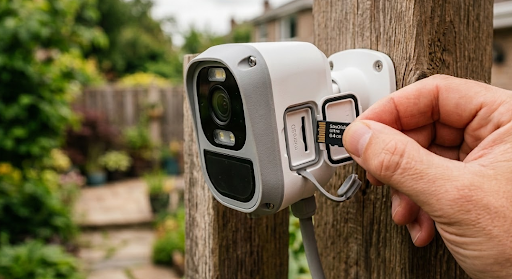
The SD card slot itself should be protected behind a sealed cover rather than exposed to the elements. Moisture getting into the card slot is one of the more common causes of card corruption and recording failures on poorly designed outdoor cameras.
Power Source
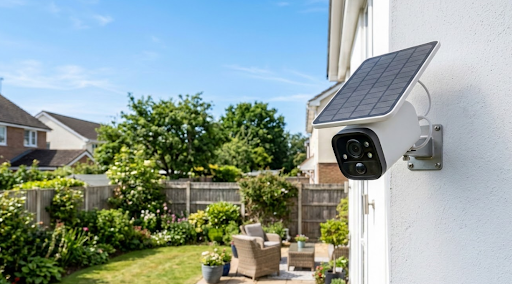
Battery cameras need recharging, which creates gaps in SD card recording if the battery runs low and nobody notices. Wired cameras are reliable but require cable installation and limit where you can mount them. Solar-powered cameras sit in the most practical position for SD card outdoor setups, running continuously on renewable energy without cable constraints or battery management. A camera that never loses power is a camera that never stops recording to its SD card, which is exactly the reliability you want from a local storage setup. For buyers exploring cable-free installation options, a wireless outdoor security camera guide covers how different power and connectivity combinations compare in real-world conditions.
The KeldCo Cameras That Get SD Card Storage Right
When it comes to finding the best security camera with SD card storage that also eliminates monthly fees entirely, the KeldCo Solar Camera Pro 2.0 4G and Solar Camera Pro 3.0 WiFi are two of the most well-rounded options available for homeowners right now.
The Solar Camera Pro 2.0 4G runs on 4G LTE cellular connectivity, making it the right pick for any location beyond your home WiFi range. Gates, outbuildings, remote driveways, and rural properties all work well with this model since it connects via SIM card and doesn't depend on your home network at all. Footage records directly to the microSD card inside the unit, the solar panel handles charging automatically, and there are no subscription fees attached to any part of the setup.
The Solar Camera Pro 3.0 WiFi is designed for homes with reliable wireless coverage and follows the same local storage approach. It connects to your home network, streams live footage to the companion app, and saves all recordings to the onboard microSD card without requiring any cloud plan. For front doors, side yards, driveways, and backyard coverage, this model gives you clean and straightforward SD card recording with no ongoing costs.
Both cameras are built for outdoor use and designed for DIY installation without professional help. For homeowners who want complete perimeter coverage, combining these with a broader DIY security system setup gives you local SD card recording at every access point without contracts or monitoring agreements.

Comparing the Two Models for SD Card Use
| Solar Camera Pro 2.0 4G | Solar Camera Pro 3.0 WiFi | |
|---|---|---|
| Connectivity | 4G LTE Cellular | WiFi (2.4GHz) |
| SD Card Storage | Yes, microSD supported | Yes, microSD supported |
| Cloud Subscription | Not required | Not required |
| Loop Recording | Yes | Yes |
| Monthly Fee | None | None |
| Power Source | Solar panel | Solar panel |
| Best Use Case | Remote areas, gates, rural spots | Home driveways, doors, yards |
For properties that need SD card recording across multiple cameras simultaneously, building out a 4 camera security system with local storage models gives you complete coverage without a single camera routing footage through a paid cloud service.
Tips for Getting the Most Out of Your SD Card Setup
Use a high-endurance microSD card rather than a standard consumer card. Security cameras write data to the card continuously, which is a far more demanding workload than saving occasional photos or videos. High-endurance cards are specifically rated for this kind of sustained read-write cycling and last significantly longer before failing. Brands like Samsung Pro Endurance and SanDisk High Endurance are purpose-built for this use case and worth the modest price premium over budget alternatives.
Format the card inside the camera using the app or settings menu before recording begins. Formatting on a computer uses a file system that may not be optimized for how your camera writes data, which can cause compatibility issues or inefficient storage use. Most cameras make this easy with a single tap in the settings menu and it only takes about 30 seconds to complete.
Review recorded clips during the first week after installation to confirm the camera is capturing what you actually need. A common mistake is mounting the camera, confirming the live feed looks right, and then not checking recorded footage until something happens. Checking early lets you catch issues like motion zones that are slightly off target or sensitivity settings that are triggering on irrelevant activity before they become a long-term problem.
For anyone expanding beyond a single camera, pairing SD card cameras with a continuous recording security camera system gives you centralized local storage and round-the-clock footage retention across your entire property without cloud dependency.
Wrapping Up: Why the Best Security Camera with SD Card Belongs in Every Home
The value of local SD card storage keeps compounding over time. Every month that passes without a subscription bill is money that stays in your pocket, and every recording that saves directly to your own card is footage that stays private, accessible, and entirely under your control. The best security camera with SD card delivers both of those things consistently without requiring you to manage a cloud account, worry about a service shutting down, or pay more each year just to maintain the same level of access.
KeldCo's Solar Camera Pro lineup does exactly that. Whether the 4G cellular model fits your remote coverage needs better or the WiFi version suits your home setup, both store everything locally, run on solar energy, and come with no ongoing fees attached. For buyers who want a complete picture of what the subscription-free camera market looks like before making a final decision, our guide to the best outdoor security cameras without a subscription covers a wide range of options worth comparing.
Frequently Asked Questions
What security cameras use SD cards?
Most modern IP cameras, solar cameras, and wire-free outdoor cameras support microSD cards for local storage. KeldCo Solar Camera Pro cameras are among the top SD card-compatible options with no subscription required.
The majority of mid-range and above security cameras include a microSD card slot as standard. The important distinction to check is whether local SD card recording is fully functional without a paid subscription, since some brands restrict local storage features to premium plan holders even on cameras that physically have a card slot. KeldCo cameras record locally out of the box with no activation or plan required.
How long will a security camera record on an SD card?
Recording duration depends on card size, video resolution, compression format, and recording mode. A 128GB card in a 1080p camera using motion-triggered H.265 recording typically stores two to four weeks of footage under average residential conditions.
Continuous recording at high resolution fills cards much faster than motion-triggered recording at 1080p. The most storage-efficient configuration for most homeowners is motion-triggered recording with H.265 compression, which captures everything relevant while using a fraction of the space that continuous 4K recording would consume. Loop recording ensures the camera keeps recording even after the card fills by overwriting the oldest clips automatically.
How long will a 256GB SD card last in a security camera?
A 256GB SD card in a 1080p motion-triggered camera typically stores four to eight weeks of footage before loop recording begins, depending on activity levels and compression settings.
Doubling the card size from 128GB to 256GB effectively doubles your retention window under similar recording conditions. For a quiet residential property using H.265 compression at 1080p with motion-triggered recording, a 256GB card can hold two months or more of clips before the oldest footage cycles out. Higher resolution or continuous recording modes will reduce that figure significantly, so matching your card size to your actual recording settings is worth thinking through before you buy.
How long will a 128GB SD card last in a security camera?
A 128GB SD card in a 1080p camera with motion-triggered H.265 recording typically lasts two to four weeks before loop recording starts overwriting the oldest clips under normal residential activity levels.
In a higher-activity environment, such as a busy driveway or a commercial entrance, a 128GB card may fill faster and loop sooner. In a quieter setting where the camera only triggers a handful of times per day, the same card can last considerably longer. Checking your camera's estimated recording duration in the app settings, if that feature is available, gives you a more accurate figure based on your specific resolution and compression configuration.
How big of an SD card should I get for my security camera?
For most home security cameras, a 128GB high-endurance microSD card is the practical starting point. If your camera supports 256GB and you want longer footage retention, stepping up is a worthwhile investment.
Start by confirming the maximum card size your camera supports, then factor in your recording mode and resolution. Motion-triggered recording at 1080p with H.265 compression is the most storage-efficient setup for residential use, and 128GB handles that comfortably for most households. If you record continuously, use higher resolution, or want a longer buffer before loop recording begins, 256GB gives you that headroom without overcomplicating anything. Always choose a card specifically rated for high-endurance or dashcam use rather than a standard consumer card, since the sustained read-write cycle of a security camera wears out regular cards far more quickly than typical photo or video storage workloads.