The best 4 camera security system combines comprehensive coverage with easy installation and reliable performance. KeldCo's Solar Camera Pro lineup delivers exactly that, offering wireless solar-powered cameras with advanced features like motion detection, night vision, and smartphone alerts without requiring professional installation or monthly subscription fees.
Four cameras provide the ideal balance between thorough property coverage and manageable setup. This configuration lets you monitor all entry points, driveways, backyards, and side areas without the complexity of larger systems. Whether you're protecting a single-family home, small business, or rental property, a 4 camera setup gives you complete visibility at an affordable price point.
Read on to discover why four cameras work perfectly for most properties, how to choose the right system, and which features matter most for reliable home security.
Why Choose a 4 Camera Security System?
Four cameras hit the sweet spot for residential security. This number covers all critical areas without overwhelming you with footage or complicated setup procedures.
Most homes have four main vulnerability points: the front door, back door, driveway, and garage or side entrance. A 4 camera configuration addresses each of these zones effectively. You gain complete perimeter monitoring without blind spots that intruders could exploit.
The system size also keeps costs reasonable compared to 8 or 16 camera setups. Installation becomes manageable for DIY projects, and reviewing footage stays simple since you're not sorting through dozens of camera feeds.
Coverage Benefits of Four Cameras
Strategic camera placement with four units creates overlapping fields of view. When one camera captures someone approaching your property, another picks them up from a different angle. This redundancy proves valuable if an intruder attempts to disable a camera or if lighting conditions affect one unit's visibility.
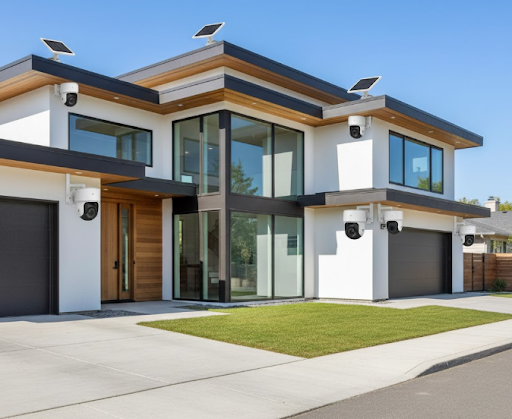
Four cameras also scale perfectly with typical property layouts. Corner-mounted cameras can monitor two sides of your home simultaneously, while dedicated units for the front and back ensure no area goes unwatched.
For those exploring DIY security systems, four cameras provide enough coverage to feel secure without requiring advanced technical knowledge to manage the footage and alerts.
What Makes KeldCo's Solar Camera Systems Stand Out

Solar-powered security cameras eliminate the biggest hassle of traditional systems: running power cables. KeldCo's Solar Camera Pro models operate entirely on solar energy with backup battery power, meaning you can install them anywhere with sunlight exposure.
The wireless design removes another major obstacle. Without network cables to run, installation takes minutes instead of hours. You simply mount the cameras, connect them to your phone app, and start monitoring immediately.
Solar Camera Pro 2.0 4G Features
The Solar Camera Pro 2.0 4G operates independently of your home WiFi network. This 4G LTE connectivity makes it perfect for remote locations, vacation homes, construction sites, or any property without reliable internet access.
Key features include:
- 4G LTE Connection: Works anywhere with cellular coverage, no WiFi needed
- 2K HD Resolution: Crystal-clear video captures facial features and license plates
- Motion-Activated Recording: Saves storage and battery by recording only when movement is detected
- Two-Way Audio: Speak to visitors or deter intruders through the built-in speaker
- Color Night Vision: See details in full color even in low light conditions
- Weatherproof Design: IP66 rating protects against rain, snow, and extreme temperatures
For properties needing surveillance in areas where WiFi doesn't reach, this model delivers reliable performance. The 4G connection ensures you receive instant alerts regardless of home network issues.
Solar Camera Pro 3.0 WIFI Advantages
The Solar Camera Pro 3.0 WIFI offers enhanced features for homes with stable wireless networks. This version provides higher resolution and advanced AI detection capabilities.
Notable specifications:
- 3MP Super HD: Sharper image quality for identifying details
- Dual-Band WiFi: Connects to both 2.4GHz and 5GHz networks for stronger signals
- Smart AI Detection: Distinguishes between people, vehicles, and animals to reduce false alerts
- Larger Solar Panel: More efficient charging for extended battery life
- Spotlight and Siren: Active deterrents that activate when motion is detected
- Cloud and Local Storage: Choose between SD card recording or cloud backup
This model suits homeowners wanting maximum features and already have reliable WiFi coverage across their property. The AI detection significantly cuts down on notifications from passing cars or neighborhood pets.
Comparing 4 Camera System Options
Different configurations serve different needs. Understanding these variations helps you select the right setup for your property and budget.
| System Type | Best For | Installation Difficulty | Monthly Cost |
|---|---|---|---|
| Solar Wireless | Remote areas, rental properties, DIY installation | Easy - no wiring needed | $0 with local storage |
| Wired PoE | Permanent installations, large properties | Moderate - requires cable running | $0 with NVR storage |
| WiFi Battery | Temporary setups, apartments | Easy - simple mounting | $0-$10 for cloud storage |
| Traditional DVR | Budget-conscious buyers, existing coax cables | Difficult - professional recommended | $0 with local DVR |
Solar wireless systems like KeldCo's offerings combine the easiest installation with zero ongoing costs when using local SD card storage. This makes them ideal for the best 4 camera security system approach for most homeowners.
Essential Features to Look For
Not all four-camera systems deliver the same value. Certain features separate reliable security from disappointing performance.
Video Quality and Resolution
Resolution determines whether you can identify faces, read license plates, or recognize packages. Minimum standards should be 1080p, though 2K or higher provides better detail for evidence purposes.
Higher resolution also allows digital zooming without losing clarity. When reviewing footage, you can zoom into specific areas to see details that lower resolution cameras miss entirely.
Consider systems offering high resolution security cameras if your property requires identifying specific details like facial features from 20+ feet away.
Night Vision Capabilities
Security threats don't stop at sunset. Quality night vision separates functional cameras from decorative ones. Look for infrared or color night vision with at least 30 feet of visibility.
Color night vision, found in KeldCo's Solar Camera Pro models, provides better detail than traditional black-and-white infrared. You can distinguish clothing colors, vehicle colors, and other identifying details that help law enforcement.
Motion Detection and Alerts
Smart motion detection prevents notification overload. Basic cameras trigger alerts for every leaf or shadow movement, creating alert fatigue where you stop checking notifications.
Advanced systems use AI to distinguish between people, vehicles, and animals. This technology, included in the Solar Camera Pro 3.0, means you only receive alerts for genuine security events.
Weather Resistance

Outdoor cameras must withstand rain, snow, heat, and humidity. IP65 or IP66 ratings ensure cameras survive normal weather conditions without failures.
KeldCo's cameras meet IP66 standards, meaning they handle powerful water jets and complete dust protection. They operate reliably in temperatures from -4°F to 122°F, covering most climate conditions.
Storage Options
Storage determines how much footage you keep and where it lives. Local storage via SD card means no monthly fees but requires manually backing up important footage.
Cloud storage offers remote access and automatic backup but usually requires subscription fees. Hybrid systems offering both options provide the most flexibility.
Installation Tips for Maximum Coverage
Proper placement makes or breaks security system effectiveness. Four cameras cover most properties well when positioned strategically.
Where to Mount Your Cameras
Camera 1 - Front Door: Mount 7-9 feet high, angled downward to capture faces clearly. This camera monitors deliveries, visitors, and the main entry point.
Camera 2 - Driveway: Position to see approaching vehicles and the license plate area. Mount high enough to avoid easy tampering but low enough for clear detail.
Camera 3 - Back Door or Patio: Cover the most common secondary entry point. Angle to see both the door and a portion of the backyard.
Camera 4 - Garage or Side Entrance: Monitor the remaining vulnerable access point. This could also cover a particularly valuable area like a tool shed or side gate.
Overlapping coverage between cameras creates backup monitoring. If someone approaches from the side, they appear in two camera feeds instead of one.
Height and Angle Considerations
Mount cameras 8-10 feet high for optimal viewing angles while staying out of easy reach. Too low allows tampering; too high loses facial detail.
Angle cameras slightly downward, about 15-30 degrees from horizontal. This captures faces better than straight-ahead mounting while still monitoring the surrounding area.
Avoid pointing cameras directly at bright lights or the sun's path, as this creates glare that obscures details during certain hours.
Budget Breakdown for 4 Camera Systems
Understanding costs helps you budget appropriately and avoid surprises. Four camera systems range from budget-friendly to premium depending on features and installation.
| Cost Component | Budget Option | Mid-Range (KeldCo) | Premium System |
|---|---|---|---|
| Camera Hardware | $200-$400 total | $400-$800 total | $800-$1,500 total |
| Installation | $0 (DIY) | $0 (DIY) or $200-$400 pro | $400-$800 professional |
| Storage | $0 (local only) | $0-$5/month (hybrid) | $10-$30/month (cloud) |
| Maintenance | Minimal | Minimal | Service contract optional |
KeldCo's solar-powered systems fall into the mid-range category but deliver premium features without monthly fees. The initial investment pays for itself within a year compared to professionally monitored systems charging $30-60 monthly.
Setting Up Your 4 Camera System

Modern systems emphasize user-friendly setup. Gone are the days requiring professional installers for basic security coverage.
Installation Steps
- Plan your layout: Identify the four most important areas needing coverage before mounting anything.
- Mount the cameras: Use the included brackets and screws. Ensure solar panels face south (in Northern Hemisphere) for maximum sunlight exposure.
- Download the app: KeldCo cameras use dedicated mobile apps for iOS and Android. Create your account during initial setup.
- Connect cameras: Follow in-app instructions to add each camera to your network. For WiFi models, enter your network password. For 4G models, insert the SIM card first.
- Adjust settings: Configure motion detection zones, notification preferences, and recording schedules.
- Test coverage: Walk around your property triggering each camera to verify motion detection works and angles capture what you need.
The entire process typically takes 1-2 hours for four cameras, even for first-time installers. No special tools beyond a drill and screwdriver are required.
Optimizing Camera Settings
After installation, fine-tune settings for best performance. Adjust motion sensitivity to avoid false alerts from trees or passing cars while still catching actual threats.
Set activity zones to monitor specific areas like doorways or driveways while ignoring busy streets or neighbor's yards. This reduces unnecessary notifications significantly.
Schedule recording based on your routine. Continuous recording drains batteries faster, while motion-activated recording balances battery life with security needs.
For comprehensive guidance, check our article on how to install security cameras for detailed visual instructions and troubleshooting tips.
Maintaining Your Security System
Regular maintenance ensures consistent performance and extends camera lifespan. Solar systems require less upkeep than wired alternatives but still benefit from periodic attention.
Routine Maintenance Tasks
Monthly:
- Wipe camera lenses with a soft cloth to remove dust, pollen, or water spots
- Check that solar panels are clean and unobstructed
- Verify all cameras still appear in your app and respond to commands
Quarterly:
- Review mounting brackets and tighten any loose screws
- Test night vision functionality by checking footage from different cameras
- Update firmware if new versions are available through the app
Annually:
- Inspect weatherproofing seals and cable connections
- Review and update your camera placement as landscaping or property features change
- Back up important footage to separate storage if using local SD cards
Solar systems require minimal intervention since they charge automatically. Battery life typically lasts 2-3 years before replacement, and most manufacturers offer affordable replacement batteries.
Common Questions About 4 Camera Systems
Before committing to a security system, most homeowners have similar questions about functionality, cost, and installation requirements.
Do I Need Professional Installation?
For solar wireless systems like KeldCo's offerings, professional installation isn't necessary. The cameras mount with basic tools, and the app guides you through wireless setup in simple steps.
Wired security camera systems sometimes benefit from professional help if you're running cables through walls or across long distances. However, surface-mounted wireless cameras avoid these complications entirely.
Can I Expand Beyond Four Cameras Later?
Most modern systems support expansion. KeldCo's cameras can be added individually to existing setups, so starting with four cameras doesn't lock you into that number permanently.
If you later decide to add coverage for a shed, pool area, or additional entrance, you simply purchase another compatible camera and add it through your app.
How Much Internet Speed Do I Need?
WiFi cameras need reliable bandwidth to stream footage and send alerts. For four cameras, plan for at least 5 Mbps upload speed with a strong signal at each camera location.
The 4G LTE version bypasses your home internet entirely, making it ideal for locations with slow or unreliable connections. It operates on cellular networks instead, requiring a SIM card with a data plan.
For properties without internet access, explore options like the LTE security camera collection which provides connectivity anywhere cellular service reaches.
Wrapping Up: Choosing Your Ideal 4 Camera Setup
Selecting the best 4 camera security system comes down to matching features with your specific needs. Solar-powered options like KeldCo's Solar Camera Pro models deliver professional-grade security without the complexity or ongoing costs of traditional systems.
Four cameras provide comprehensive coverage for most residential properties while keeping installation simple and costs manageable. The wireless, solar-powered design eliminates the two biggest obstacles to DIY security: running power cables and network wiring.
Whether you choose the 4G LTE model for remote properties or the advanced WiFi version for smart home integration, you're investing in reliable protection that works continuously without monthly subscription fees. The system scales with your needs, adapts to different property layouts, and requires minimal maintenance once installed.
Start protecting your property today with a four-camera system that combines ease of use with serious security features. Your home deserves reliable monitoring, and modern solar technology makes that protection more accessible than ever.
Explore related security topics:
- Best outdoor security camera comparisons and recommendations
- Security cameras that work without WiFi for remote locations
- Understanding different types of security cameras for your property
Frequently Asked Questions
What are the 4 types of security cameras?
The four main security camera types are dome cameras (ceiling-mounted indoor/outdoor units), bullet cameras (long cylindrical outdoor cameras), PTZ cameras (pan-tilt-zoom controllable units), and wireless cameras (battery or solar-powered standalone units). Each serves different purposes, with wireless solar cameras like KeldCo's models offering the easiest installation and most flexible placement options for residential use.
How much to install 4 CCTV cameras?
Professional installation for four CCTV cameras typically costs $400-$800 for labor, plus $300-$1,000 for equipment depending on quality. However, wireless solar cameras eliminate installation costs entirely since they mount with basic tools and require no wiring. KeldCo's DIY-friendly systems let you install four cameras yourself in under two hours, saving hundreds on professional installation fees.
What is the cost of a 4 channel CCTV camera setup?
A complete 4 channel CCTV setup ranges from $500-$1,500 including the DVR/NVR recorder, four cameras, cables, and basic installation. Wireless solar alternatives like KeldCo's systems cost $400-$800 for four cameras with no recorder needed since footage saves to SD cards or cloud storage, eliminating the DVR expense and reducing overall system cost.
How much to install 4 wireless cameras?
DIY installation of four wireless cameras costs $0 in labor since no technical expertise is required. You only pay for the cameras themselves, typically $400-$800 for quality units like KeldCo's Solar Camera Pro models. If hiring professionals anyway, expect $200-$400 for mounting and basic setup, though this defeats the main advantage of wireless systems which is simple DIY installation.
Can CCTV work without internet?
Yes, CCTV cameras work without internet by recording to local storage like SD cards or DVR/NVR systems. You won't receive remote alerts or view live footage from your phone without internet, but recording continues normally. For properties without WiFi, KeldCo's Solar Camera Pro 2.0 4G uses cellular networks instead, providing full remote access and alerts without requiring home internet service.