The best self monitoring security system puts you in complete control of your home's safety without expensive monthly subscriptions. KeldCo's Solar Camera Pro 3.0 WIFI stands out as the top choice, offering crystal-clear video, intelligent motion detection, and unlimited cloud storage - all without recurring fees.
Self-monitoring means you receive alerts directly to your phone and can view live footage anytime, anywhere. Unlike traditional systems that require professional monitoring services, you become your own security team. This approach saves money while giving you instant access to what matters most: protecting your family and property.
Ready to take control of your home security? Let's explore everything you need to know about choosing and using the best self monitoring security system for your needs.
What Makes a Security System "Self-Monitoring"?
Self-monitoring security systems let you watch over your property directly through your smartphone or computer. When motion is detected or an alarm triggers, you get instant notifications. You decide how to respond - whether that means checking the live feed, calling authorities, or ignoring a false alarm from your cat.
Traditional monitored systems send alerts to a third-party monitoring center first. Staff members then contact you or emergency services. This adds response time and costs $15-60 per month. Self-monitoring cuts out the middleman entirely.
The technology works through internet connectivity. Cameras and sensors connect to your WiFi network, streaming footage and sending alerts through a mobile app. You control everything from recording schedules to notification settings. Modern systems like the Solar Camera Pro 2.0 4G even work without WiFi, using cellular networks for remote locations.
Key Features of Self-Monitoring Systems
Look for these essential capabilities when choosing your system:
- Mobile app control: Manage cameras, view footage, and receive alerts from anywhere
- Cloud storage options: Save recordings without physical storage devices
- Two-way audio: Communicate through cameras to warn intruders or greet visitors
- Motion detection zones: Customize which areas trigger alerts to reduce false notifications
- Night vision: Monitor your property 24/7, even in complete darkness

Why Choose Self-Monitoring Over Professional Monitoring?
The financial benefits alone make self-monitoring attractive. Professional monitoring services charge between $180 and $720 annually. Over five years, that's $900 to $3,600 in subscription fees. Self-monitored systems eliminate these ongoing costs entirely.
Beyond savings, you gain immediate control. Professional services create delays - alerts go to a call center, staff reviews the situation, then contacts you or authorities. This process can take several minutes. With self-monitoring, you see what's happening the moment it occurs.
Privacy also improves significantly. Your footage stays in your control. No third-party company stores or reviews your recordings unless you choose cloud storage. For those concerned about data security, this direct relationship with your security system offers peace of mind.
Here's how the two approaches compare:
| Feature | Self-Monitoring | Professional Monitoring |
|---|---|---|
| Monthly Cost | $0 | $15-60 |
| Response Time | Instant | 2-5 minutes |
| Data Privacy | Full control | Shared with service |
| False Alarm Fees | None | $50-200 per incident |
| Equipment Control | Complete | Limited by contract |
Professional monitoring does offer one advantage - automatic emergency dispatch. If you're unable to respond to an alert, a monitoring service can still contact authorities. However, modern self-monitoring systems let you designate emergency contacts who receive alerts when you can't respond.
Top Features to Look for in the Best Self Monitoring Security System

Video Quality and Night Vision
Resolution matters when identifying faces, license plates, or suspicious activity. The best systems offer at least 1080p video quality. The Solar Camera Pro 3.0 WIFI delivers exceptional 2K resolution, capturing details that lower-quality cameras miss.
Night vision extends your security coverage to 24 hours. Infrared LEDs illuminate areas up to 50 feet away without visible light. Color night vision, available on premium models, provides even better identification capabilities by preserving actual colors rather than displaying only black and white footage.
Power Options and Weather Resistance
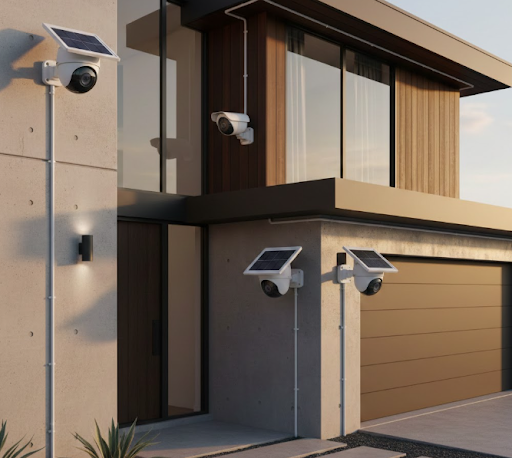
Solar-powered cameras eliminate wiring hassles and ongoing electricity costs. Built-in batteries store energy for nighttime operation and cloudy days. This makes installation incredibly flexible - place cameras anywhere with decent sunlight exposure.
Weather resistance is non-negotiable for outdoor cameras. Look for IP65 or higher ratings, which protect against rain, snow, and dust. Quality cameras withstand temperatures from -4°F to 122°F, ensuring year-round operation regardless of climate.
Smart Detection and Alerts
Basic motion detection triggers constantly - swaying trees, passing cars, even moving shadows can create false alarms. Advanced systems use AI to distinguish between people, vehicles, and animals. You can set specific alert preferences, like notifications only for human detection near your front door.
Customizable detection zones let you monitor specific areas while ignoring others. For example, focus on your driveway and porch while excluding the street to avoid alerts from passing pedestrians.
Storage Solutions
Storage determines how long you can review past footage. Options include:
Local storage: SD cards or hard drives store recordings directly on the device or a hub. This offers privacy and no monthly fees, but limited capacity and vulnerability to theft or damage.
Cloud storage: Recordings upload to secure servers accessible from anywhere. Many self-monitoring systems offer free cloud storage for a limited time (typically 7-30 days). Extended storage or additional cameras may require paid plans, though these still cost less than professional monitoring.
Hybrid approach: The best solution combines both. Local storage provides immediate backup, while cloud storage ensures recordings survive if equipment is damaged or stolen.
Installation and Setup: Easier Than You Think
Setting up a DIY security system takes less time than you might expect. Most wireless systems install in under an hour without professional help. Solar-powered cameras eliminate the most challenging part - running electrical wiring.
Basic Installation Steps
- Choose camera locations: Identify entry points, high-traffic areas, and vulnerable spots around your property. Mount cameras 8-10 feet high for optimal coverage and to prevent tampering.
- Mount the cameras: Use the included brackets and screws. Ensure solar panels face south (in the Northern Hemisphere) for maximum sun exposure.
- Download the mobile app: Most systems use a single app for all cameras. Create an account and follow the setup wizard.
- Connect cameras to WiFi: Scan QR codes or enter network credentials. Some models like the Solar Camera Pro 2.0 4G use cellular connectivity, skipping this step entirely.
- Customize settings: Set motion detection zones, notification preferences, and recording schedules.
- Test the system: Trigger motion sensors and verify alerts arrive on your phone. Check video quality and adjust camera angles if needed.
For homes without WiFi coverage in certain areas, consider LTE security cameras that operate independently through cellular networks.
Choosing the Right System for Your Property

Property size and layout determine how many cameras you need. A small apartment might need only one or two cameras, while larger homes benefit from comprehensive coverage.
Coverage Planning
Start by identifying priority areas:
- Front door and porch: Captures 34% of break-in attempts according to security studies
- Back door: Accounts for 22% of entries
- First-floor windows: Common entry points in single-story homes
- Garage and driveway: Protects vehicles and monitors arrivals
- Side gates: Prevents access to backyards and hidden areas
A 4 camera security system typically provides adequate coverage for most single-family homes. Larger properties or those with multiple buildings may require an 8 camera security system for complete protection.
Indoor vs. Outdoor Needs
Outdoor cameras face harsher conditions and need features like weather resistance, wider viewing angles, and powerful night vision. Indoor cameras can prioritize discretion and two-way audio for checking on pets or communicating with family members.
Consider specialized cameras for specific needs:
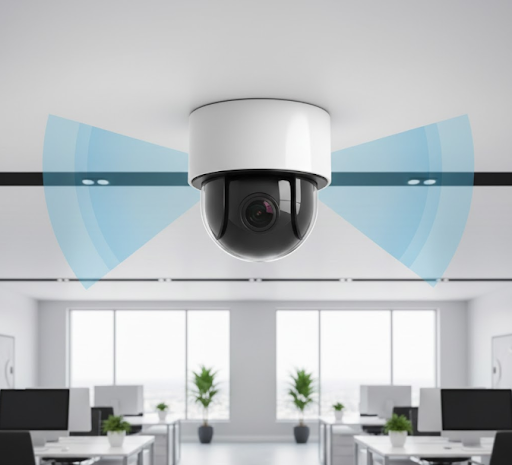
- PTZ cameras: Pan, tilt, and zoom to cover large areas with a single device
- Window cameras: Monitor through glass without glare or reflection issues
- Wide-angle cameras: Capture 130-180 degree views, reducing blind spots
Maintaining and Optimizing Your Self-Monitoring System
Regular maintenance keeps your system running smoothly. Solar panels need occasional cleaning - dust and debris reduce charging efficiency. Wipe panels with a soft cloth and water every few months.
Check camera angles seasonally. Growing trees, new construction, or landscape changes can block views. Adjust positions to maintain clear sight lines.
Update firmware when manufacturers release new versions. These updates often include security patches, bug fixes, and new features. Most systems notify you through the app when updates are available.
Battery health matters for solar cameras. Monitor battery levels through your app. If cameras consistently show low charge despite adequate sunlight, the battery may need replacement after 2-3 years of use.
Maximizing Battery Life
Extend solar camera battery performance with these tips:
- Position panels to receive direct sunlight for at least 4 hours daily
- Reduce recording frequency during low-activity periods
- Adjust motion sensitivity to avoid unnecessary recordings
- Enable sleep mode during times when monitoring isn't critical
Learn more about optimal placement in our guide on how much sunlight does a solar security camera need.
Common Concerns and Solutions
| Concern | Solution |
|---|---|
| WiFi dead zones | Use cellular cameras or WiFi extenders |
| Limited storage | Combine local SD cards with cloud backup |
| False motion alerts | Adjust sensitivity and set detection zones |
| Night visibility | Choose cameras with infrared or color night vision |
| Weather damage | Select IP65+ rated weatherproof cameras |

Dealing with False Alarms
False alarms frustrate users and can lead to alert fatigue. Combat this issue by:
- Creating activity zones that exclude moving branches or busy streets
- Adjusting motion sensitivity - start high and gradually reduce until alerts become relevant
- Using AI-powered person detection to filter out animals and vehicles
- Setting notification schedules to avoid alerts during expected activity periods
Legal Considerations and Best Practices
Understanding privacy laws protects you from legal issues. Video surveillance laws vary by state and municipality. Generally, you can record any area visible from public spaces or your property. However, pointing cameras at neighbors' windows or private areas may violate privacy laws.
Audio recording has stricter regulations. Many states require all-party consent, meaning everyone being recorded must know and agree. Check local laws before enabling audio features.
Post visible signs indicating video surveillance is active. This serves two purposes - it deters potential intruders and satisfies legal notification requirements in most jurisdictions.
Respect neighbors' privacy by adjusting camera angles to avoid recording their property. Most conflicts arise from perceived invasions of privacy rather than actual legal violations.
For professional installations in commercial settings, explore business CCTV solutions that address workplace privacy regulations.
Integration with Smart Home Systems
Modern self-monitoring systems work seamlessly with smart home platforms. Integration enables powerful automation scenarios:
- Cameras turn on automatically when smart locks detect your departure
- Motion detection triggers smart lights to illuminate and potentially scare intruders
- Video doorbells work with smart speakers to announce visitors
- Security cameras share footage with smart displays throughout your home
Popular integrations include Amazon Alexa, Google Assistant, and Apple HomeKit. Check compatibility before purchasing if smart home integration matters to you.
Cost Analysis: Investment vs. Monthly Fees
Initial investment in quality self-monitoring equipment pays for itself quickly. Here's a realistic cost breakdown:
Initial Costs:
- 4 solar cameras: $400-800
- Mobile app: Free
- Installation (DIY): $0
- Total: $400-800
Ongoing Costs:
- Monthly fees: $0
- Annual maintenance: $0-50 (battery replacement if needed)
- Cloud storage (optional): $0-10/month
Compare this to professionally monitored systems:
Initial Costs:
- Equipment: $200-500 (often subsidized)
- Installation: $0-200
- Total: $200-700
Ongoing Costs:
- Monthly monitoring: $15-60
- Annual maintenance: $0
- Total over 5 years: $900-3,600 in monitoring fees
The best self monitoring security system eliminates $180-720 in annual fees while providing equal or better functionality. Your equipment pays for itself within the first year.
KeldCo's Solar Camera Pro: The Best Choice
After reviewing dozens of options, KeldCo's Solar Camera Pro series stands out as the best self monitoring security system for most users. The Solar Camera Pro 3.0 WIFI offers exceptional value with 2K resolution, color night vision, and truly wireless operation.
What sets KeldCo apart:
- No subscription required: Free cloud storage and unlimited device connections
- 100% wire-free: Solar power eliminates installation complexity
- Advanced AI detection: Distinguishes people, vehicles, and animals
- Weatherproof design: IP65 rating withstands extreme conditions
- Long battery life: 20,000mAh battery operates for weeks without sunlight
For locations without WiFi, the Solar Camera Pro 2.0 4G provides cellular connectivity, perfect for remote properties, RV security, or construction sites.
Both models include two-way audio, 355° pan and 120° tilt capabilities, and crystal-clear video quality that captures details other cameras miss. The intuitive mobile app puts complete control in your hands.
Real-World Applications and Success Stories
Self-monitoring systems protect homes, businesses, and properties of all types. Understanding how others use these systems can inspire your own security setup.
Vacation Homes: Remote properties benefit enormously from self-monitoring. Solar cameras with cellular connectivity let owners check on seasonal homes without WiFi service. Motion alerts notify owners of unexpected visitors or potential break-ins.
Small Businesses: Shop owners use self-monitoring to oversee operations outside business hours. The savings from eliminating monitoring fees can reach thousands annually. Real-time alerts let owners respond to after-hours activity immediately.
Construction Sites: Equipment theft plagues construction projects. Solar cameras with continuous recording capabilities document activity without requiring power or internet connections at temporary work sites.
Elderly Care: Families use indoor cameras to check on aging parents while respecting independence. Two-way audio enables communication without constant phone calls. Motion detection can alert family members if normal activity patterns change.
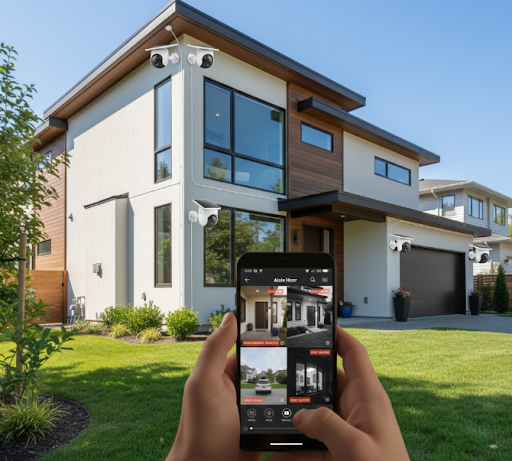
IMAGE SUGGESTION: Smartphone screen showing a security camera app interface with four camera feeds visible, clean modern UI design, realistic mobile phone mockup
Troubleshooting Common Issues
Even the best systems occasionally need troubleshooting. Here's how to solve typical problems:
Camera Won't Connect to WiFi: Verify network credentials, ensure your router broadcasts 2.4GHz signal (many cameras don't support 5GHz), and check that cameras are within range of your router.
Poor Video Quality: Clean camera lenses, check available bandwidth (streaming multiple cameras requires strong internet speeds), and verify camera settings haven't defaulted to lower resolution.
Missing Recordings: Confirm SD card is properly inserted and formatted, check available storage space, and verify recording schedules are active. Our guide on security camera doesn't detect SD card offers detailed troubleshooting steps.
Weak Battery Performance: Clean solar panels, adjust camera position for better sun exposure, reduce recording frequency, and consider if seasonal changes affect sunlight availability.
Delayed Notifications: Check phone notification settings, verify app has necessary permissions, ensure strong internet connection, and confirm motion detection zones are properly configured.
For comprehensive setup guidance, review our article on how to install security cameras.
Future-Proofing Your Security Investment
Technology evolves rapidly, but choosing the right system now ensures years of reliable service. Look for manufacturers committed to ongoing updates and improvements.
Expandability matters. Your security needs may grow as you add outdoor structures, expand your property, or simply want more comprehensive coverage. Systems that easily add cameras without replacing existing equipment protect your investment.
Consider emerging technologies without overpaying for unproven features. Current standouts include:
- AI-powered facial recognition for identifying known individuals
- Package detection to alert you when deliveries arrive
- Vehicle recognition to distinguish residents' cars from unknown vehicles
- Enhanced night vision using starlight sensors for color footage in near-darkness
Avoid proprietary systems that lock you into specific brands or require specialized equipment. Open platforms that work with various camera types offer flexibility as technology advances.
Your Path to Better Home Security
Taking control of your home security doesn't require technical expertise or significant investment. The best self monitoring security system gives you professional-grade protection without professional-grade costs.
Start by assessing your property's vulnerabilities. Identify entry points, high-value areas, and blind spots. This evaluation guides your camera placement and helps determine how many devices you need.
Choose quality equipment that matches your specific needs. Solar-powered cameras eliminate wiring challenges, while wireless options offer installation flexibility. For locations without internet access, cellular cameras provide reliable connectivity.
Remember that security is an ongoing process, not a one-time purchase. Regular maintenance, periodic reviews of your coverage, and staying informed about new features ensure your system continues protecting what matters most.
The peace of mind from knowing you can check on your property anytime, from anywhere, proves invaluable. Whether you're at work, on vacation, or simply in another room, your security system stays vigilant.
Frequently Asked Questions
Can I self-monitor my home security system?
Yes, absolutely. Modern security cameras and systems send alerts directly to your smartphone, letting you monitor your property without professional services. You control everything through a mobile app.
Self-monitoring works through internet connectivity. When motion triggers a camera, you receive instant notifications. View live footage, review recordings, and even communicate through two-way audio - all from your phone. This approach eliminates monthly monitoring fees while giving you immediate awareness of activities around your home.
What is the best self monitoring alarm system?
KeldCo's Solar Camera Pro systems are the best choice. They offer superior video quality, no subscription fees, and complete wireless operation powered by solar energy.
These systems stand out because they combine professional-grade features with user-friendly operation. You get 2K resolution, AI-powered detection, unlimited cloud storage, and weatherproof construction without ongoing costs. The Solar Camera Pro 3.0 WIFI and 2.0 4G models cover both WiFi and cellular connectivity needs, making them versatile for any property type.
What security system works without a subscription?
Most modern self-monitored camera systems operate without subscriptions. KeldCo's Solar Camera Pro series, Ring cameras (with local storage), and many other brands offer full functionality without monthly fees.
The key is choosing systems that include local storage options or free cloud storage tiers. These eliminate the need for paid monitoring services while maintaining all essential features. You save hundreds of dollars annually while retaining complete control over your security footage and alerts.
Can you run your own security system without a service provider?
Yes, and it's becoming the preferred approach for many homeowners. Self-managed systems give you direct access to alerts and footage without involving third-party monitoring companies.
Modern technology makes this practical through smartphone apps and cloud connectivity. You become your own monitoring service, receiving real-time notifications and deciding how to respond. This eliminates monthly fees, reduces response delays, and keeps your privacy completely under your control.
Can I use my security system without monitoring?
Definitely. Security cameras function perfectly without professional monitoring services. They record footage, detect motion, and send alerts regardless of whether a monitoring company is involved.
Think of monitoring as an optional add-on rather than a requirement. Your cameras still protect your property by recording evidence, deterring intruders with visible presence, and alerting you to activity. The only difference is you receive notifications directly instead of through a call center. For many users, this direct connection actually improves security by eliminating communication delays.